

Skip to content
KalvyAI

POS Advanced Receipt Design

8 thermal receipt designs, live preview and AI assistant for Point of Sale.

Choose from 8 ready thermal receipt designs or describe your layout to the AI Receipt Assistant. Features instant live preview for 58mm and 80mm paper, custom logos, tax breakdowns, QR codes, offline printing, and support for 18 languages with bilingual receipts.

  • Odoo 19.0
  • Odoo 20.0
Availableon Odoo Apps

$11$29one-timeLaunch offer

POS Advanced Receipt Design lets you print beautiful Point of Sale receipts without writing a single line of code. Choose from 8 ready black-and-white designs crafted specifically for 58 mm and 80 mm thermal printers, ensuring that on-screen receipts, paper prints, and customer emails look identical.

The built-in AI Receipt Assistant configures your receipt from plain language requests. Simply type what you want—like 'Add the GST number and cashier name' or 'Hide the barcode and enlarge text'—and the AI updates the layout for your review before saving. Works with any provider configured in AI Base, including Claude, OpenAI, Gemini, Grok, DeepSeek, and local LLMs.

Designed for international retailers, supermarkets, and restaurants: customize branding, logos, QR codes, discount banners, amount in words, and tip suggestions. Receipts can be printed in the customer's or cashier's language, or in two languages simultaneously (such as Arabic + English) with full right-to-left layout support.

Screenshots

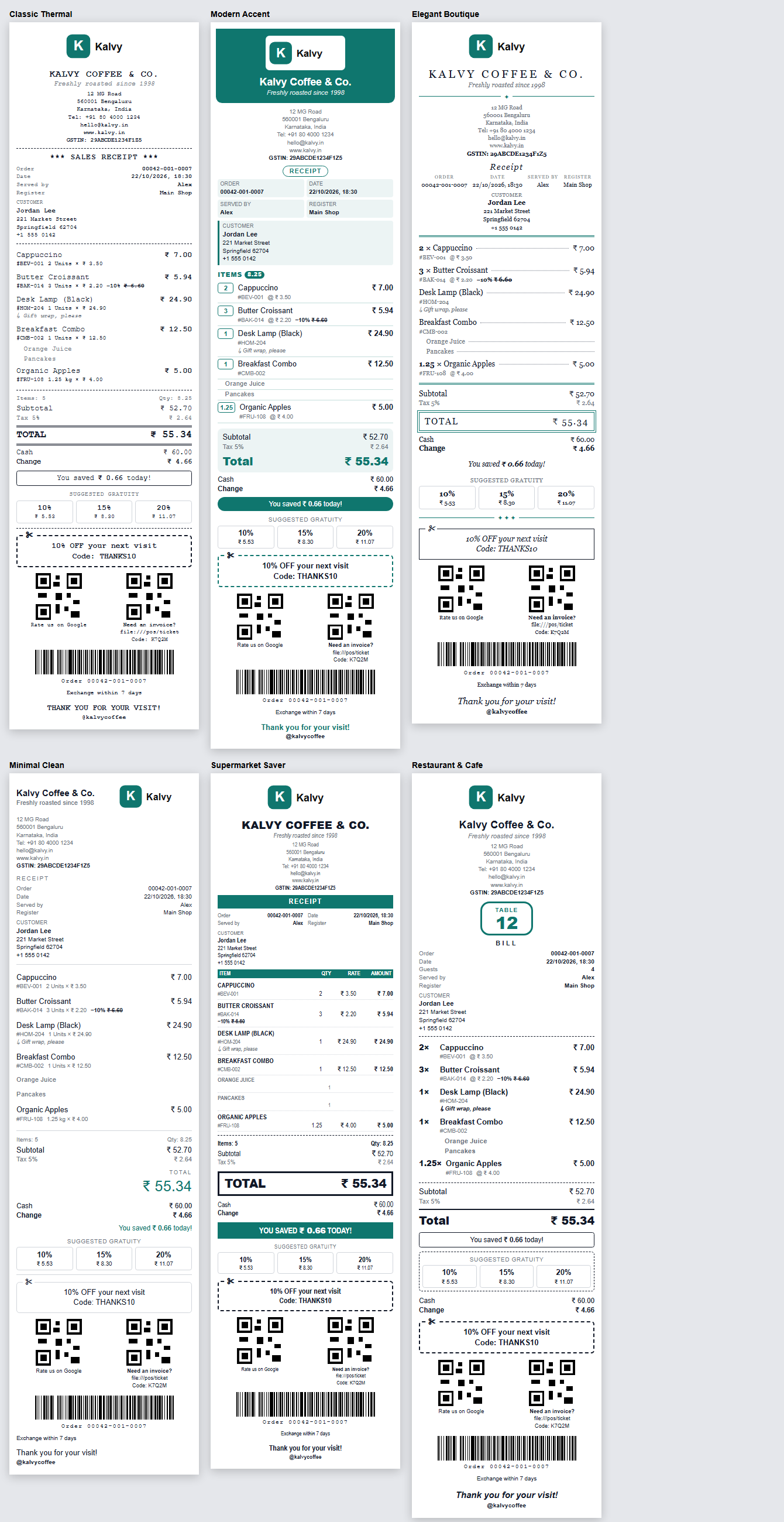
Six receipt designs: Classic Thermal, Modern Accent, Elegant Boutique, Minimal Clean, Supermarket Saver, Restaurant & Cafe
Six ready designs: Classic Thermal, Modern Accent, Elegant Boutique, Minimal Clean, Supermarket Saver, Restaurant & Cafe
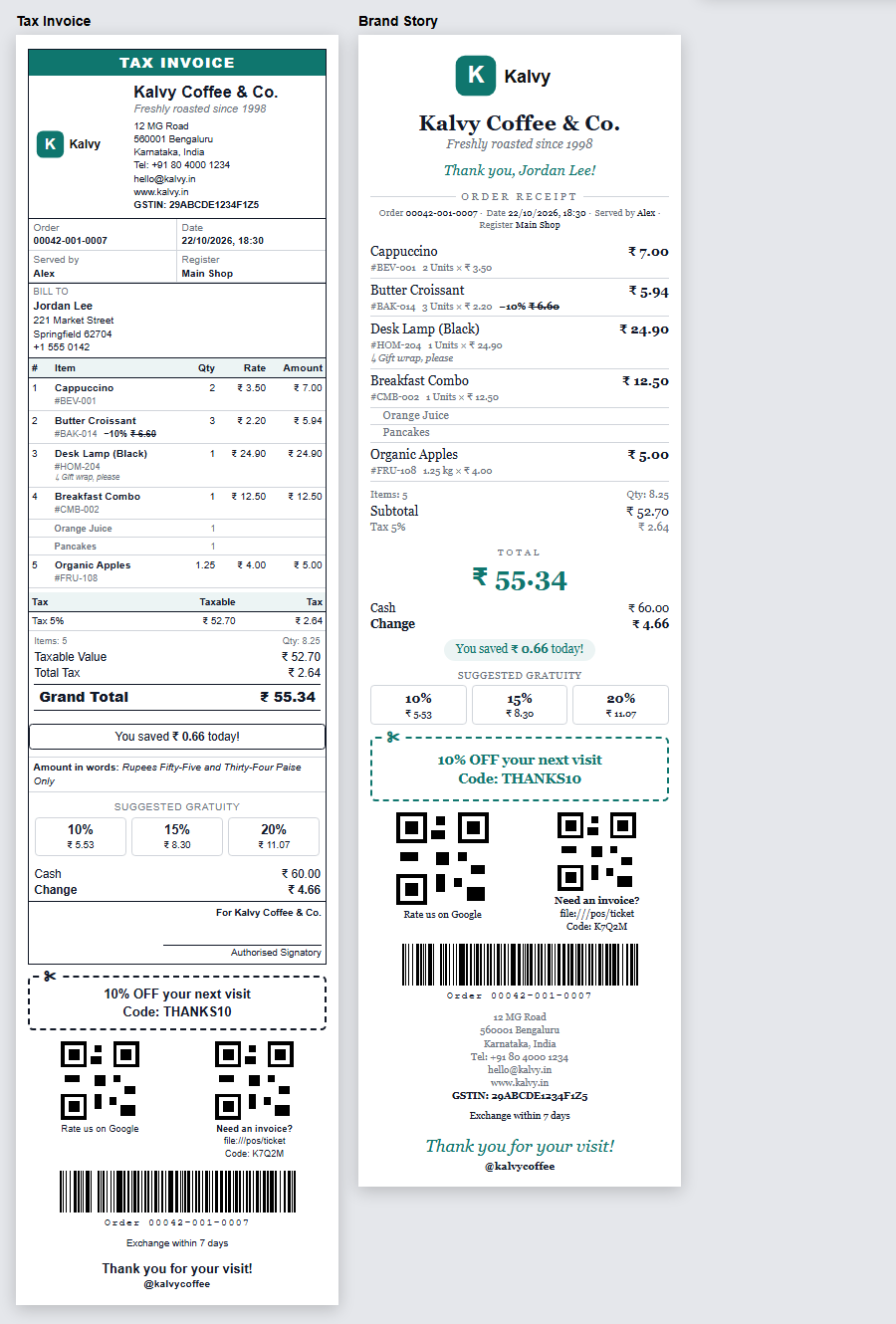
Tax Invoice and Brand Story receipt designs
Tax Invoice and Brand Story receipt designs with tax breakdown and brand messaging

What it does

8 Ready Receipt Designs

Classic Thermal, Modern Accent, Elegant Boutique, Minimal Clean, Supermarket Saver, Restaurant & Cafe, Tax Invoice, and Brand Story.

AI Receipt Assistant

Describe what you want on the receipt in plain words. Any provider from AI Base (Gemini, Claude, OpenAI, Grok, DeepSeek) updates the settings automatically.

Live Visual Preview (58mm & 80mm)

See the exact printed receipt in real-time as you toggle blocks, change fonts, or adjust branding before printing on the counter.

Complete Block & Content Control

Show or hide company address, tax ID/GSTIN, cashier, customer, product SKU codes, discounts, savings banner, amount in words, and order barcode.

Custom QR Code & Promotions

Add a custom QR code pointing to a review page, digital menu, Wi-Fi, or website, alongside promo coupons and return terms.

18 Languages & Bilingual Receipts

Print in the cashier's, company's, or customer's language, or print bilingual receipts (e.g., Arabic + English) with automatic right-to-left alignment.

Made for Thermal Printers & Offline

Pure black-and-white layouts optimized for thermal paper. Logo, QR codes, barcodes, and translations are cached locally to work seamlessly offline.

Counter Design Switcher

Allow cashiers to quickly switch between receipt templates directly from the POS receipt screen to reprint orders with alternate layouts.

Setup

  1. 1

    Install the Module

    Install POS Advanced Receipt Design from Apps. Point of Sale and the free AI Base module are configured automatically.

  2. 2

    Enable Advanced Receipts

    In Point of Sale › Configuration › Settings › Bills & Receipts, enable Advanced Receipt Design and choose your default template.

  3. 3

    Customize in Receipt Designer

    Open Receipt Designer to pick a design, toggle blocks, add your logo and QR code, or let the AI Assistant configure it with a prompt.

  4. 4

    Sell and Print

    Reload your Point of Sale session. All customer receipts, printouts, and digital emails immediately use your customized design.

What you need

  • Odoo 19.0 or 20.0 (Community or Enterprise), hosted on Odoo.sh or your own server
  • Standard Odoo Point of Sale module
  • Free KalvyAI AI Base module (included and installed automatically)
  • Standard 58 mm or 80 mm thermal receipt printer (ESC/POS, IoT Box, or browser print)
  • Optional: API key from any AI provider (Gemini, OpenAI, Claude, Grok, etc.) for the AI Assistant

Good to know

  • Odoo Online (SaaS) is not supported: custom modules require Odoo.sh or on-premise hosting.
  • Fiscal localizations requiring certified legal content (e.g. Saudi ZATCA QR, German TSE) should keep standard receipts.
  • Loyalty point balances, coupon codes, and eWallet details from pos_loyalty are not yet printed on the advanced receipt.
  • Fixed black-and-white layouts designed for thermal printers; colors and custom CSS positioning are not supported.
  • Amount in words is printed in English (including Indian lakh/crore format for INR).
  • Languages must be activated in General Settings before selecting them for receipts.

Questions

Which Odoo versions and hostings are supported?

Odoo 19.0 and 20.0 Community and Enterprise on Odoo.sh or self-hosted servers. Odoo Online (SaaS) is not supported.

Do I need an AI provider key to use this module?

No. The visual designer, all 8 designs, thermal layouts, and 18 languages work completely without AI. AI is only needed for the conversational assistant.

Will it work with my thermal receipt printer?

Yes. All designs are pure black-and-white layouts optimized for standard 58 mm and 80 mm thermal paper rolls.

Can different Point of Sale counters use different designs?

Yes. Receipt design and formatting settings are configured independently per Point of Sale.

Does it work when the internet is disconnected?

Yes. Logo, barcodes, QR codes, and translated labels are cached in the browser POS session, so receipts print normally offline.

Can I print Arabic and English on the same receipt?

Yes. Enabling Second Language prints bilingual labels (e.g., الإجمالي / Total) with right-to-left layout for Arabic, Hebrew, Persian, and Urdu.

Buy directly, book a demo or ask a question

Buying from us directly suits invoices in your company's name, several databases, or help with installation. We reply with a quote within one business day. Card checkout comes later.

We reply by email within one business day. See our privacy notice.