
Skip to content
KalvyAI

Cashfree Payment Gateway

Accept UPI, cards and net banking with recovery, refund control & settlement reconciliation.

Accept payments with Cashfree Checkout: UPI, credit/debit cards, net banking, and wallets. Automates failed-payment recovery emails, refund approval workflows, hourly discrepancy checks, and settlement reconciliation with fees, tax, and bank statements.

  • Odoo 19.0
  • Odoo 20.0
Availableon Odoo Apps

$25$49one-timeLaunch offer

Cashfree Payment Gateway for Odoo gives your business full payment capabilities across quotations, sales orders, invoices, and eCommerce portals. Customers pay easily through Cashfree Checkout using UPI, credit and debit cards, net banking, or digital wallets with real-time status verification.

Beyond payment processing, the module automates operational workflows that are typically manual. When a payment fails, an automated recovery sequence sends gentle reminder emails with instant pay links at 45 minutes, 24 hours, and 72 hours. Built-in refund limits enforce dual-approval workflows before processing refunds, eliminating unauthorized payouts.

Keep your books in balance with automated settlement reconciliation: import settlement files, separate gateway fees and GST, generate journal entries, and automatically match bank statement lines by UTR. Continuous hourly discrepancy checks flag any mismatch between Odoo and Cashfree, keeping your finance team informed.

Screenshots

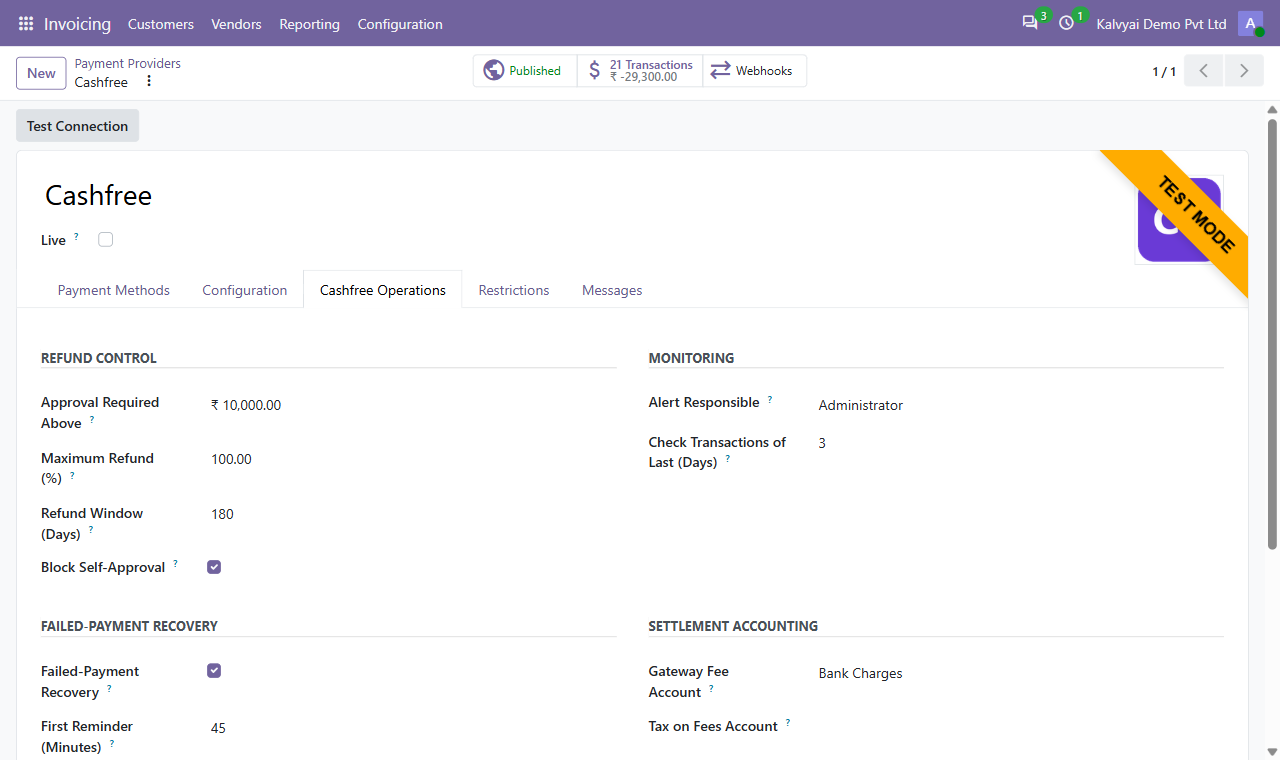
Cashfree Operations settings: refund limits, monitoring, recovery and accounts
Cashfree Operations: refund limits, monitoring, recovery and accounts
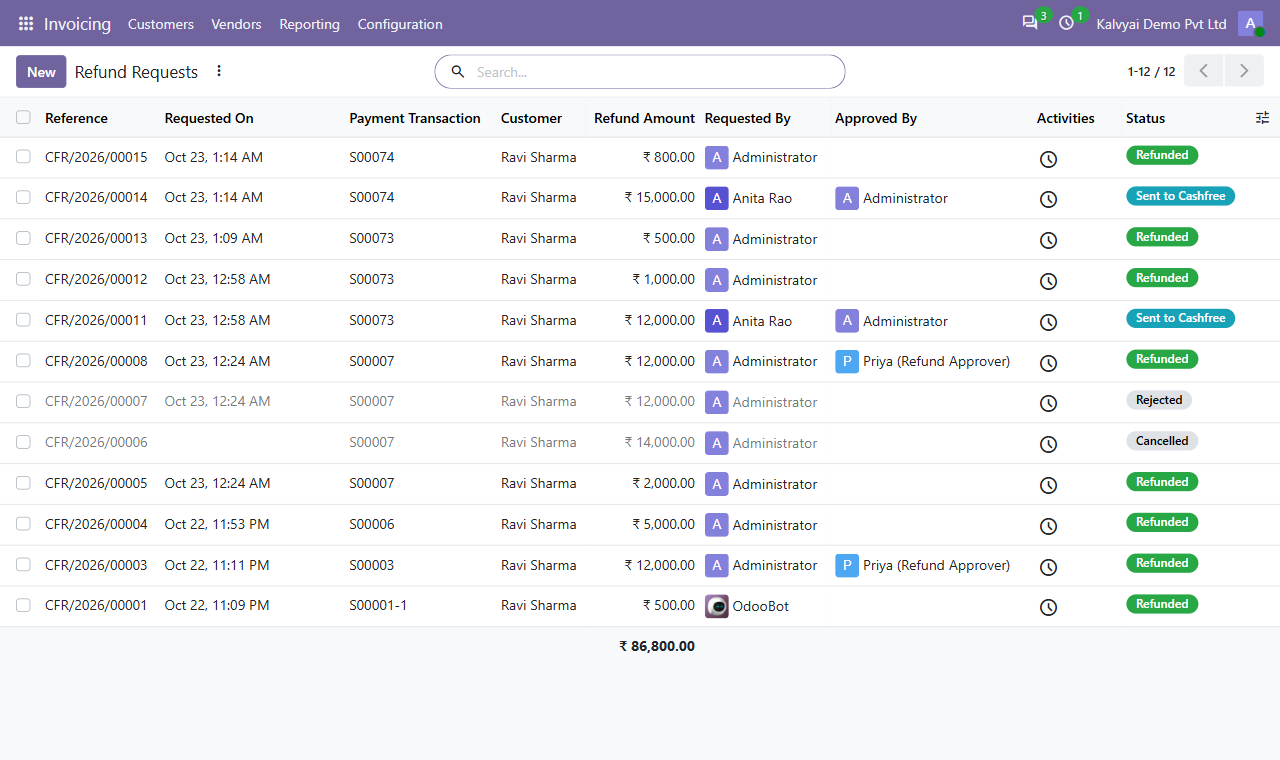
Refund requests with requester, approver and status
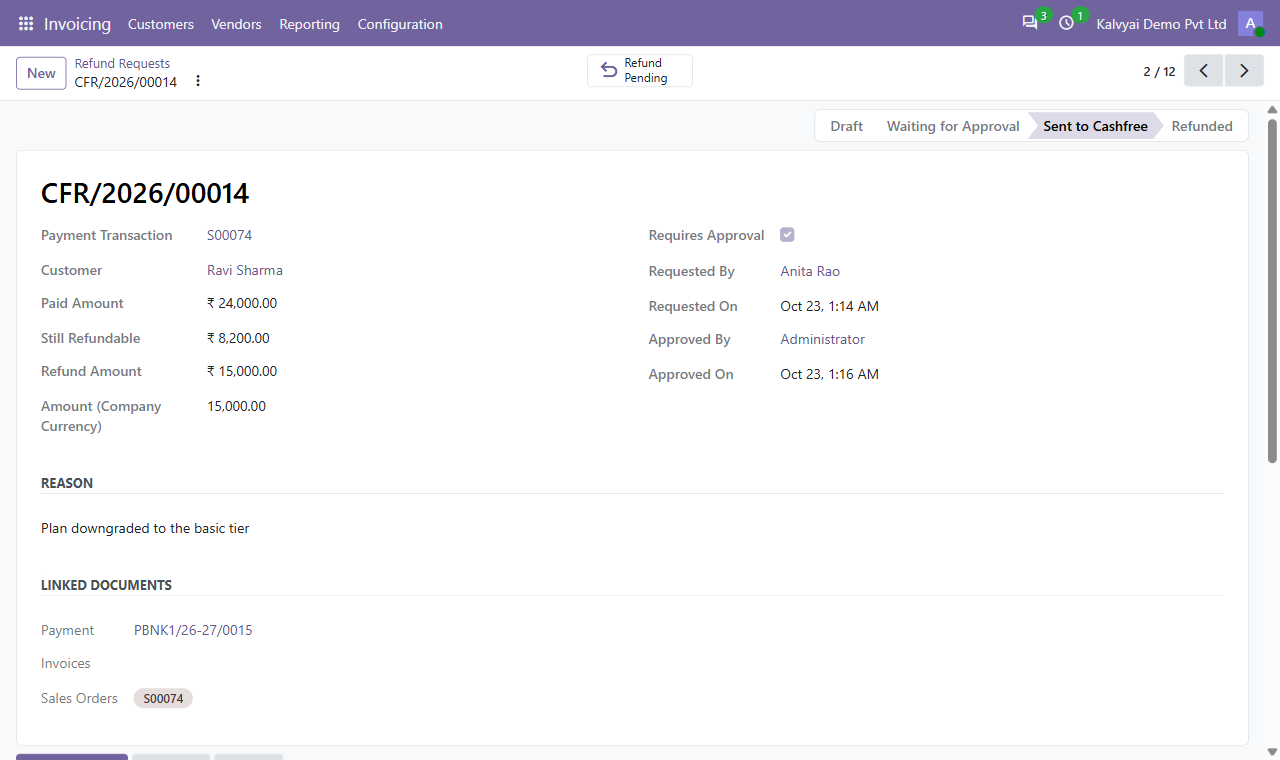
A refund request approved by a second person
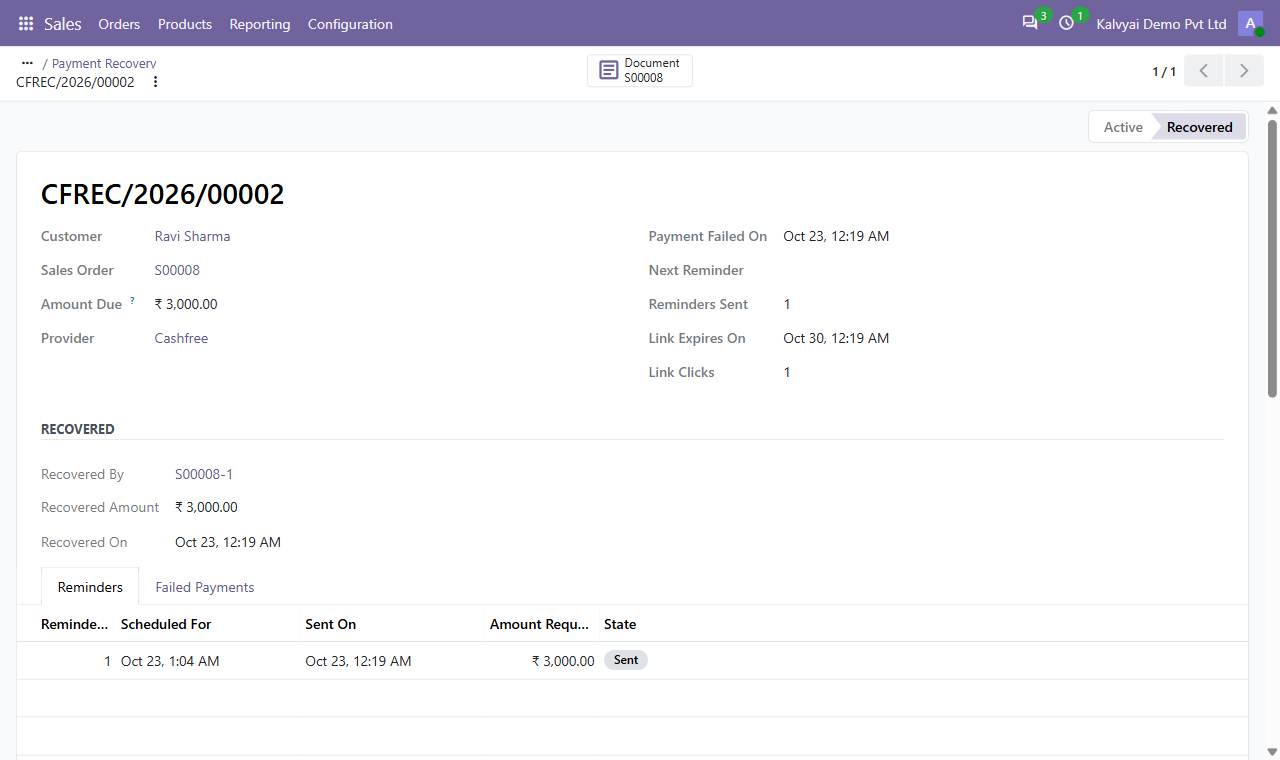
Payment recovery: reminders sent, payment recovered
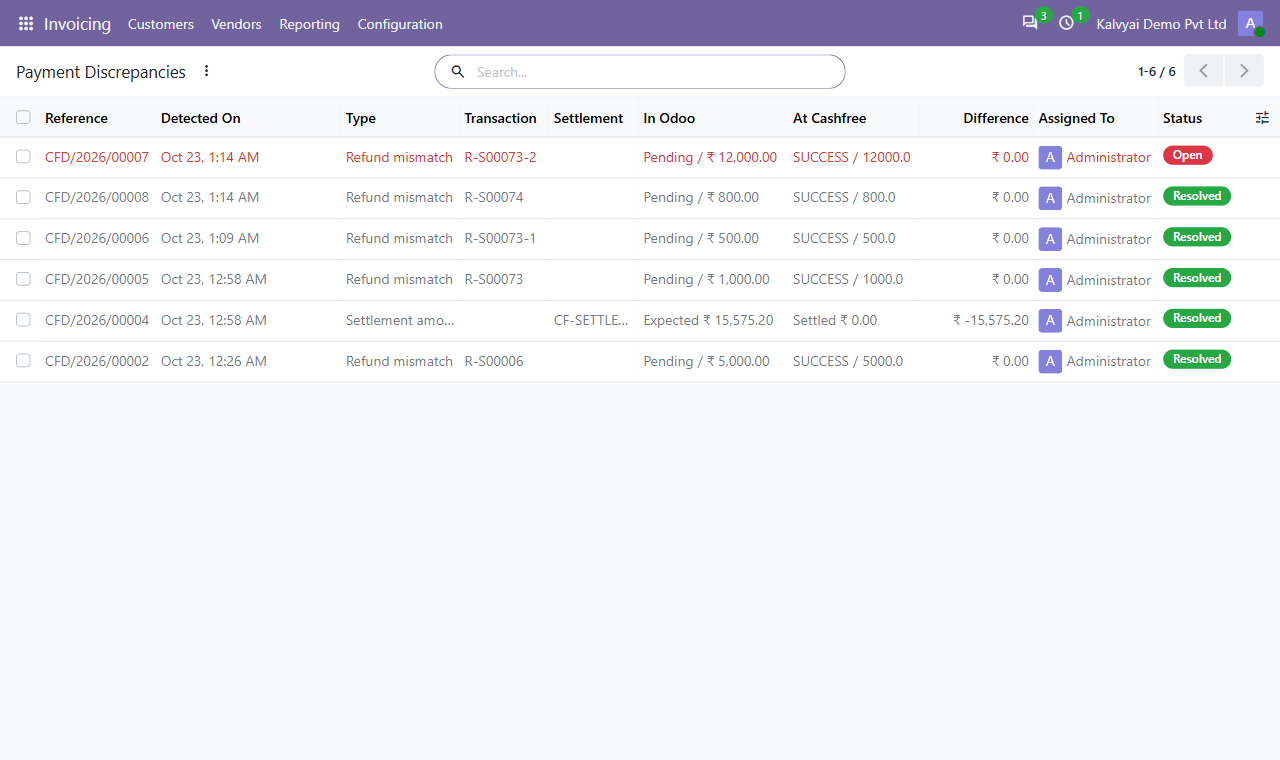
Payment discrepancies between Odoo and Cashfree
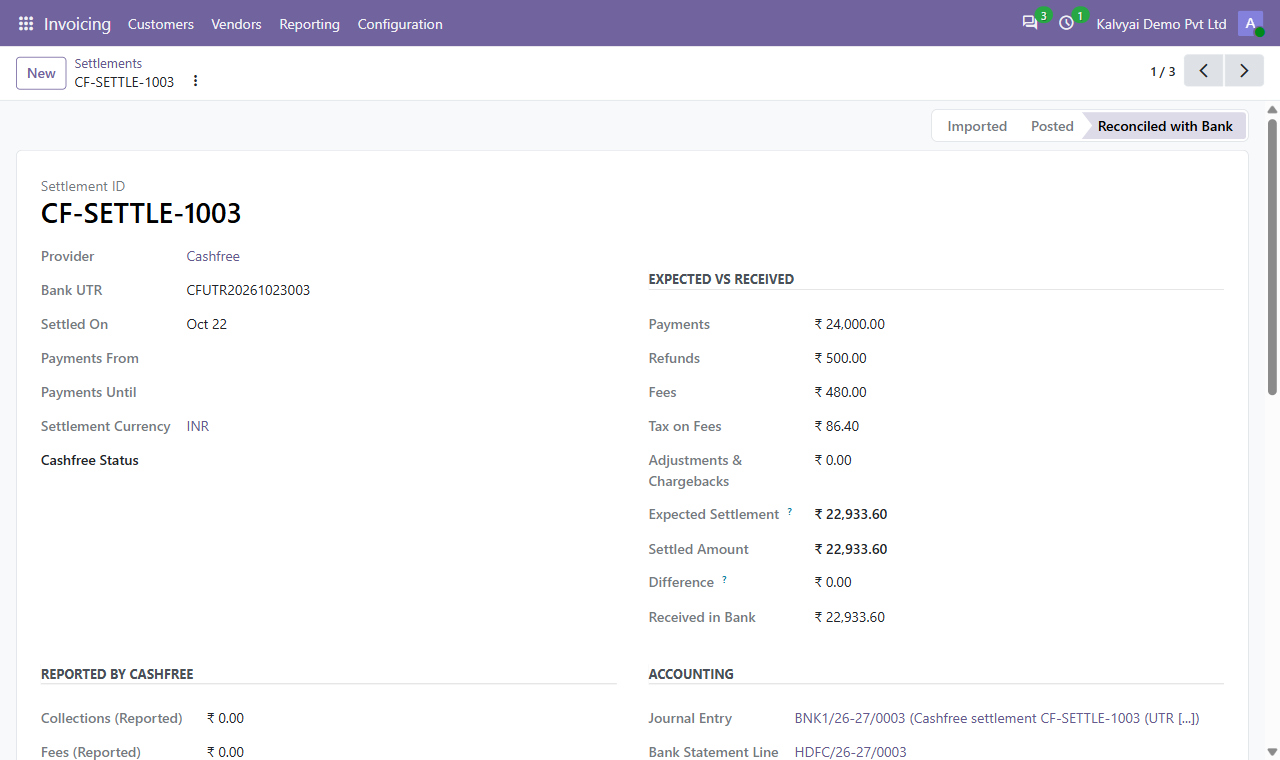
Settlement: expected versus received, reconciled with the bank
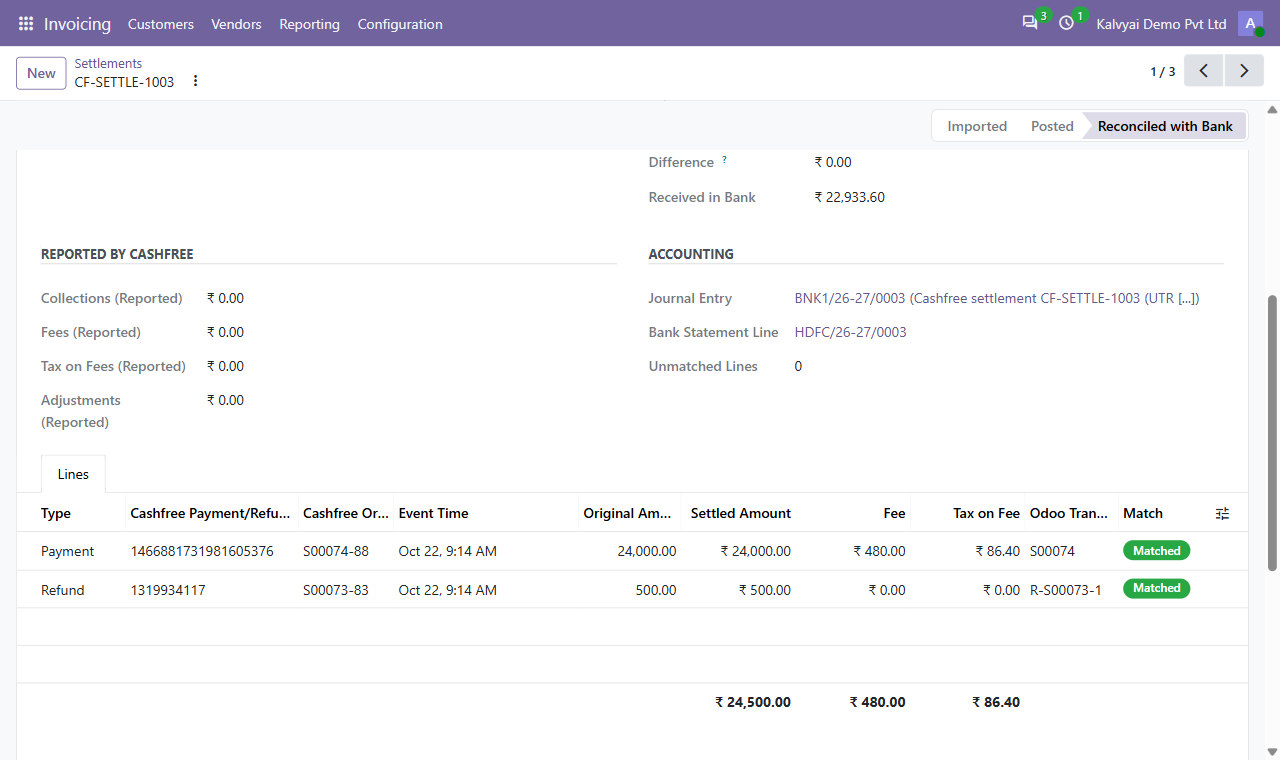
Settlement lines matched to Odoo payments and refunds
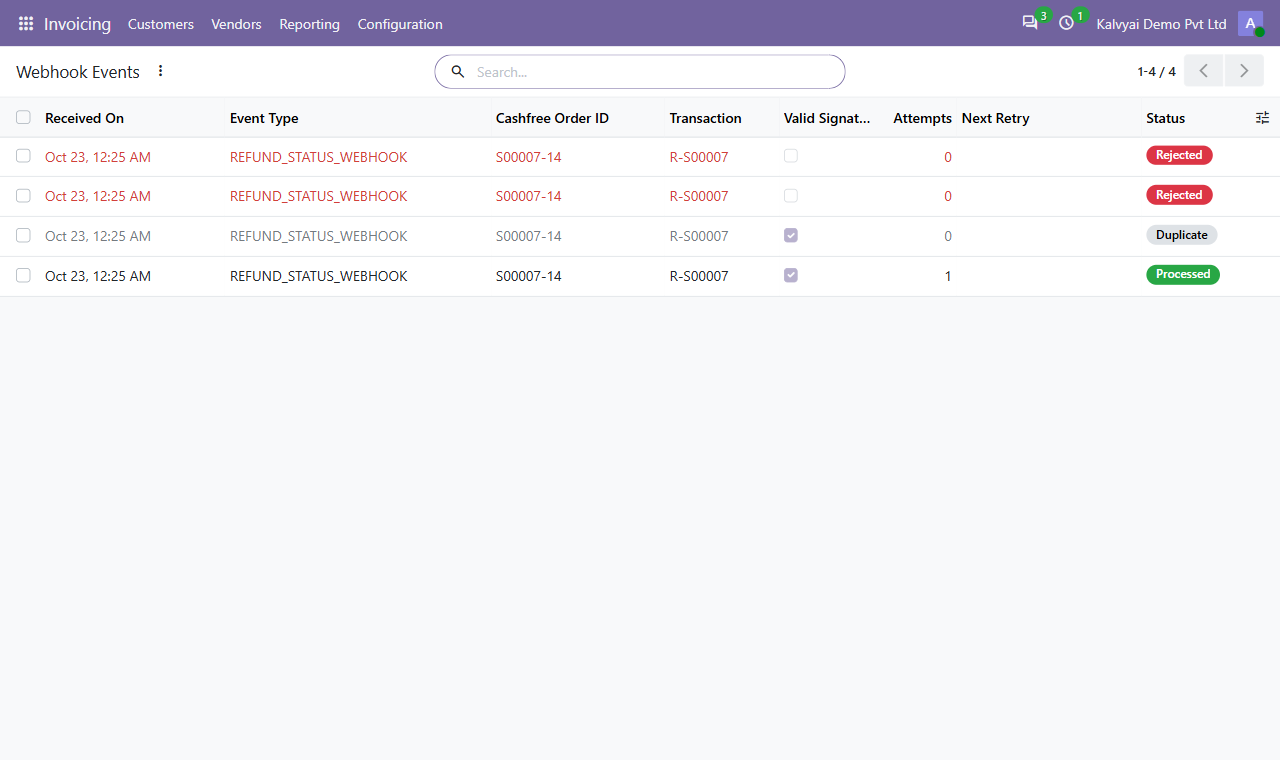
Webhook log: processed, duplicate and rejected notifications
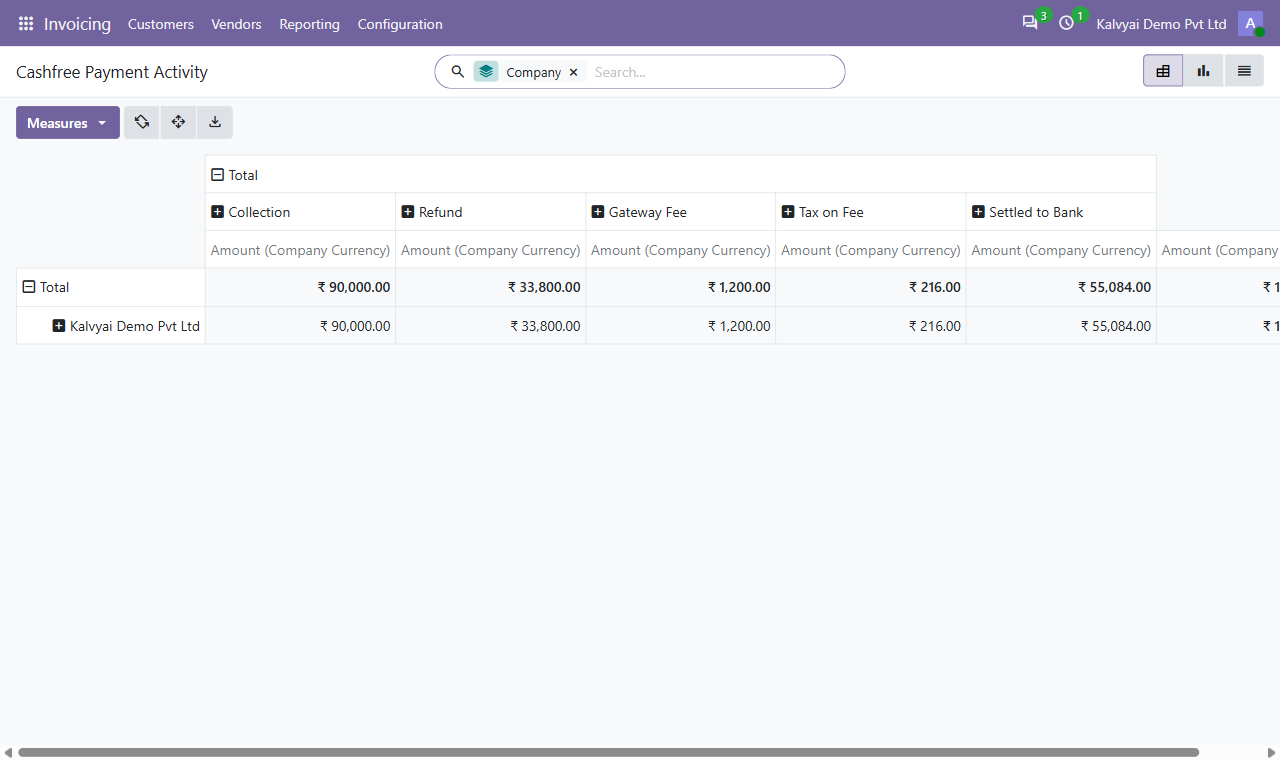
Payment Activity report

What it does

Cashfree Checkout (UPI, Cards, Net Banking)

Customers pay via UPI, cards (Visa, Mastercard, RuPay, Amex), net banking, and wallets. Multi-currency support for international transactions.

Automated Payment Recovery

Recovers failed transactions with automated reminder emails and direct payment links at 45m, 24h, and 72h, with quiet hours and instant cancel on payment.

Refund Limits & Dual Approval

Enforce approval controls on refunds exceeding configured thresholds. Requesters cannot approve their own refunds, with full audit trail logging.

Settlement Import & Bank Reconciliation

Daily import of Cashfree settlements with automatic journal entry creation for gross payments, refunds, gateway fees, GST, and bank matching by UTR.

Hourly Discrepancy Monitoring

Hourly background check compares Odoo transactions against the Cashfree API. Generates manager alerts and daily digests for any status mismatch.

Secure Webhook Queue

Signed webhook events are cryptographically verified with replay protection, duplicate filtering, and automated retries on network errors.

Payment Activity Analytics

Comprehensive reporting for transactions, refunds, fees, and settlements in pivot table, graphical chart, and detailed list views.

Multi-Company & Role-Based Access

Independent provider configurations per company with dedicated security groups: User, Refund Approver, and Manager.

Setup

  1. 1

    Install Module

    Install Cashfree Payments. Required dependencies (Invoicing, Online Payments, Sales) are configured automatically.

  2. 2

    Connect Credentials

    Go to Invoicing › Configuration › Online Payments › Cashfree, enter your App ID and Secret Key, and click Test Connection.

  3. 3

    Configure Webhook & Operations

    Paste the provided Webhook URL into your Cashfree Developer Dashboard, and set your refund limits and recovery email options in Odoo.

  4. 4

    Publish and Go Live

    Set the provider state to Enabled or Published. Customers can now immediately checkout using Cashfree.

What you need

  • Odoo 19.0 or 20.0 (Community or Enterprise), on Odoo.sh or self-hosted
  • Standard Odoo Invoicing (account_payment) and Sales (sale) modules
  • Active Cashfree merchant account (sandbox test keys or production credentials)
  • Public HTTPS URL for receiving signed webhook notifications
  • Standard Odoo mail server configured for payment recovery reminder emails

Good to know

  • Odoo Online (SaaS) is not supported: custom modules require Odoo.sh or on-premise hosting.
  • Webhooks require a publicly accessible HTTPS URL; localhost environments rely on manual status checks.
  • Refunds post outbound accounting payments; credit notes should be generated separately if required by local tax law.
  • Payment recovery emails are sent via Odoo's outgoing mail server; recovery is disabled by default until activated.
  • Cashfree gateway fees and taxes are billed directly by Cashfree per your merchant agreement.
  • Currency availability depends on currencies enabled on your Cashfree merchant account.

Questions

Which Odoo editions and versions are supported?

Odoo 19.0 and 20.0, both Community and Enterprise editions, on Odoo.sh or self-hosted servers.

Do I need Odoo Enterprise or full accounting for settlement reconciliation?

No. Settlement reconciliation uses standard Invoicing features and works identically in Community and Enterprise.

Can I test with Cashfree sandbox keys first?

Yes. Leave the Live toggle unticked and enter your Cashfree sandbox App ID and Secret Key for safe end-to-end testing.

Which payment methods can customers use?

UPI (Google Pay, PhonePe, Paytm, etc.), credit and debit cards (Visa, Mastercard, RuPay, Amex), net banking across Indian banks, and wallets.

How does settlement reconciliation handle Cashfree fees and GST?

Posting a settlement automatically books gateway fees to your fee expense account and GST to the tax account, matching the net deposit by UTR.

Will customers who already paid get a recovery reminder?

No. Before each reminder is dispatched, Odoo verifies the current due balance and queries Cashfree. Paid orders are automatically excluded.

Buy directly, book a demo or ask a question

Buying from us directly suits invoices in your company's name, several databases, or help with installation. We reply with a quote within one business day. Card checkout comes later.

We reply by email within one business day. See our privacy notice.