

Skip to content
KalvyAI

WhatsApp AI Commerce

Sell on WhatsApp, with checkout and stock from Odoo.

Customers browse your catalog, fill a cart and pay inside WhatsApp, while an AI sales assistant answers by text or voice using live Odoo stock and prices. Built on the official Meta Cloud API.

  • Odoo 19.0
  • Odoo 20.0
Availableon Odoo Apps

$49$99one-timeLaunch offer

WhatsApp AI Commerce turns your WhatsApp Business number into a sales channel that runs on Odoo. Products come from your Odoo catalog, every cart is an Odoo quotation, and payment goes through the payment providers you already use in Odoo.

An AI sales assistant handles the conversation. It answers questions, adds items to the cart, shows the cart, starts checkout and resends invoices, always from live Odoo stock and prices. Customers can send voice notes, which are transcribed and handled like text. Returning customers are recognised by phone number.

AI is optional. Without an AI key, customers still shop with simple keywords (catalog, cart, checkout) and buttons. Unpaid carts get an automatic reminder, and paid orders an automatic confirmation.

Screenshots

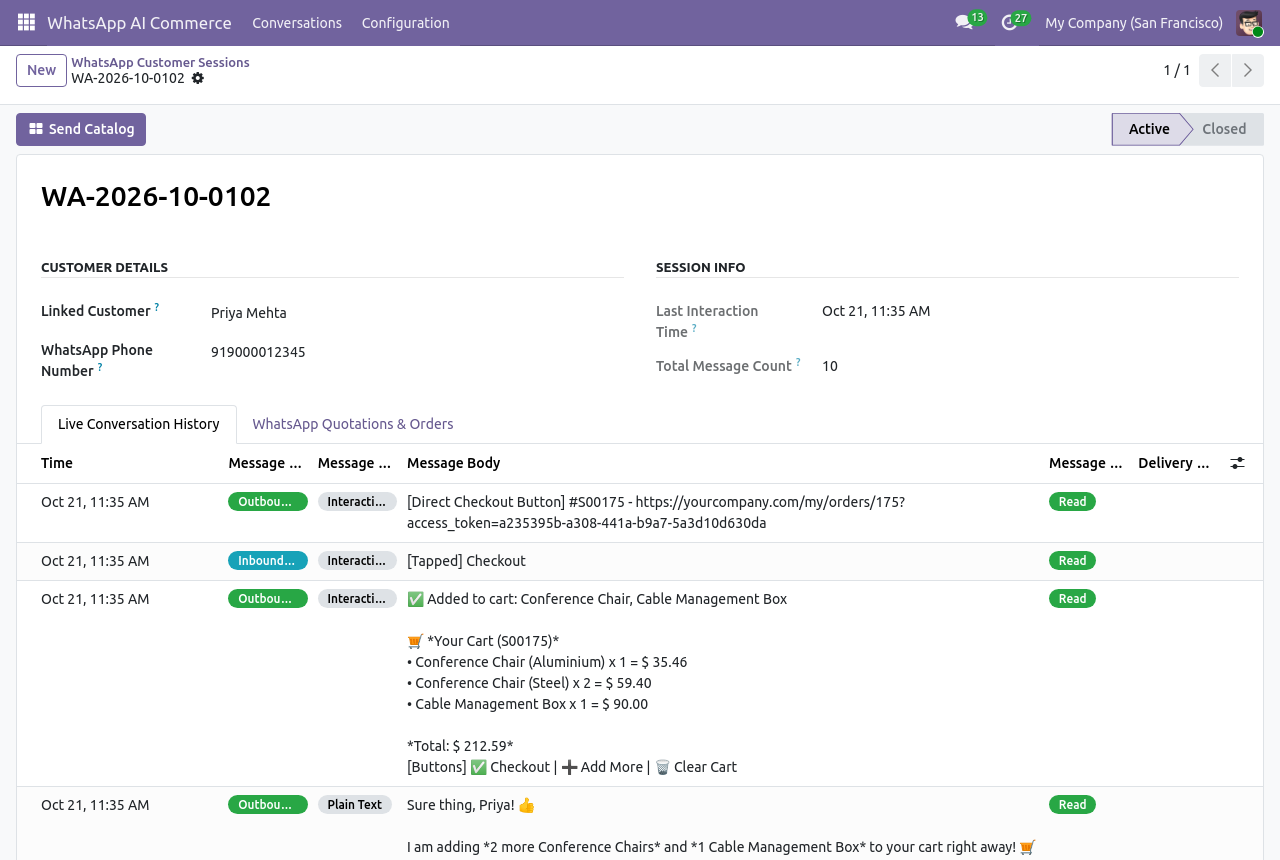
WhatsApp chat history in Odoo showing a customer ordering through the AI sales assistant
Each conversation is kept in Odoo with delivery status.
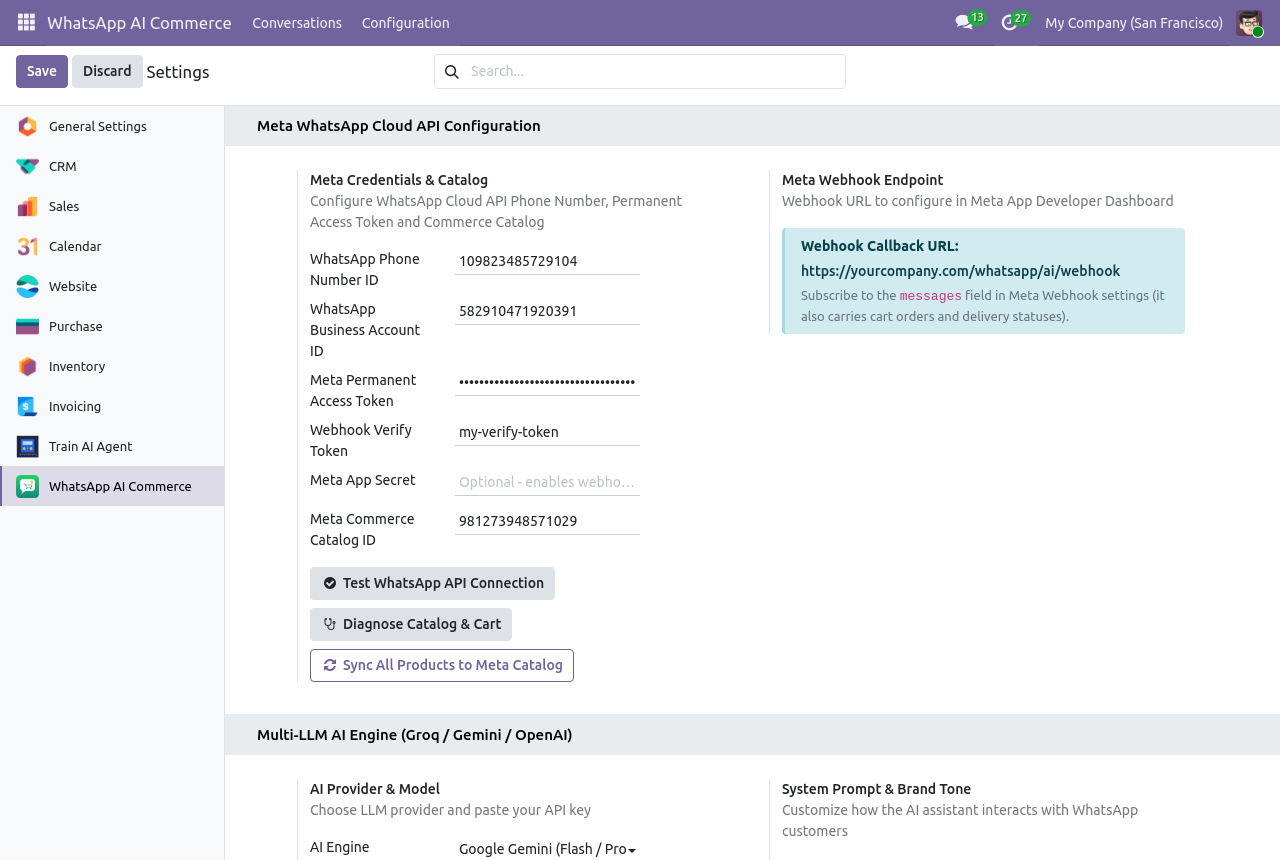
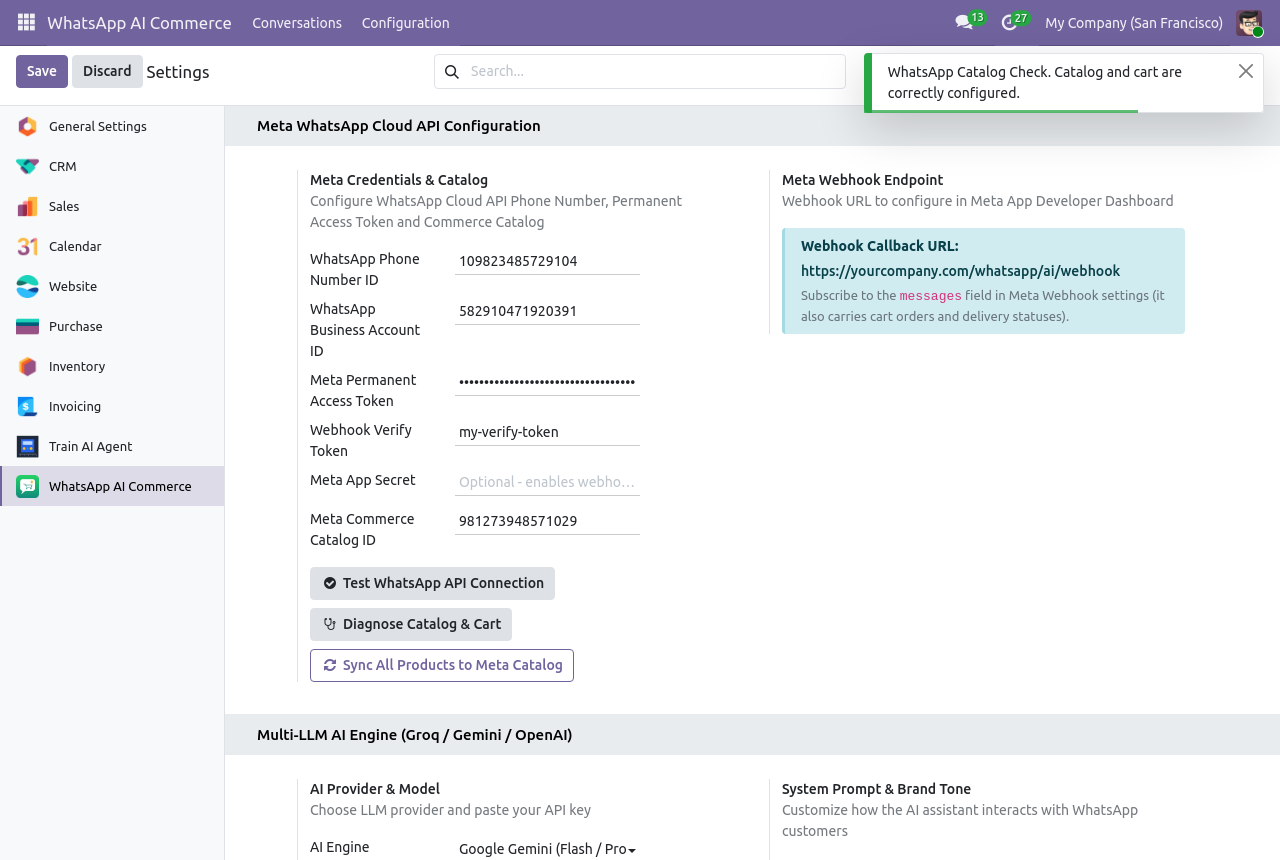
WhatsApp AI Commerce settings in Odoo: Meta Cloud API credentials and AI provider
Settings: Meta Cloud API details and the AI provider.
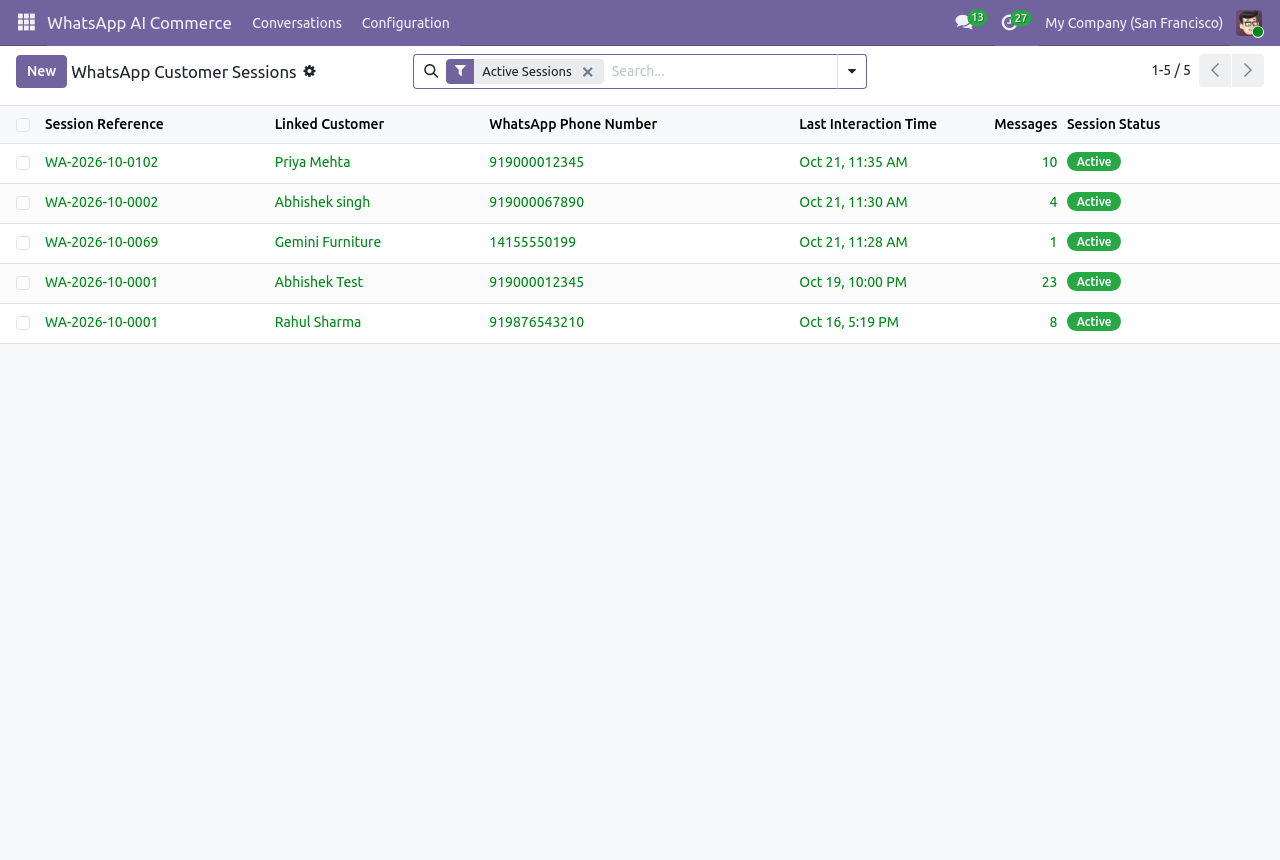
List of WhatsApp conversations in Odoo
All WhatsApp conversations in one list.
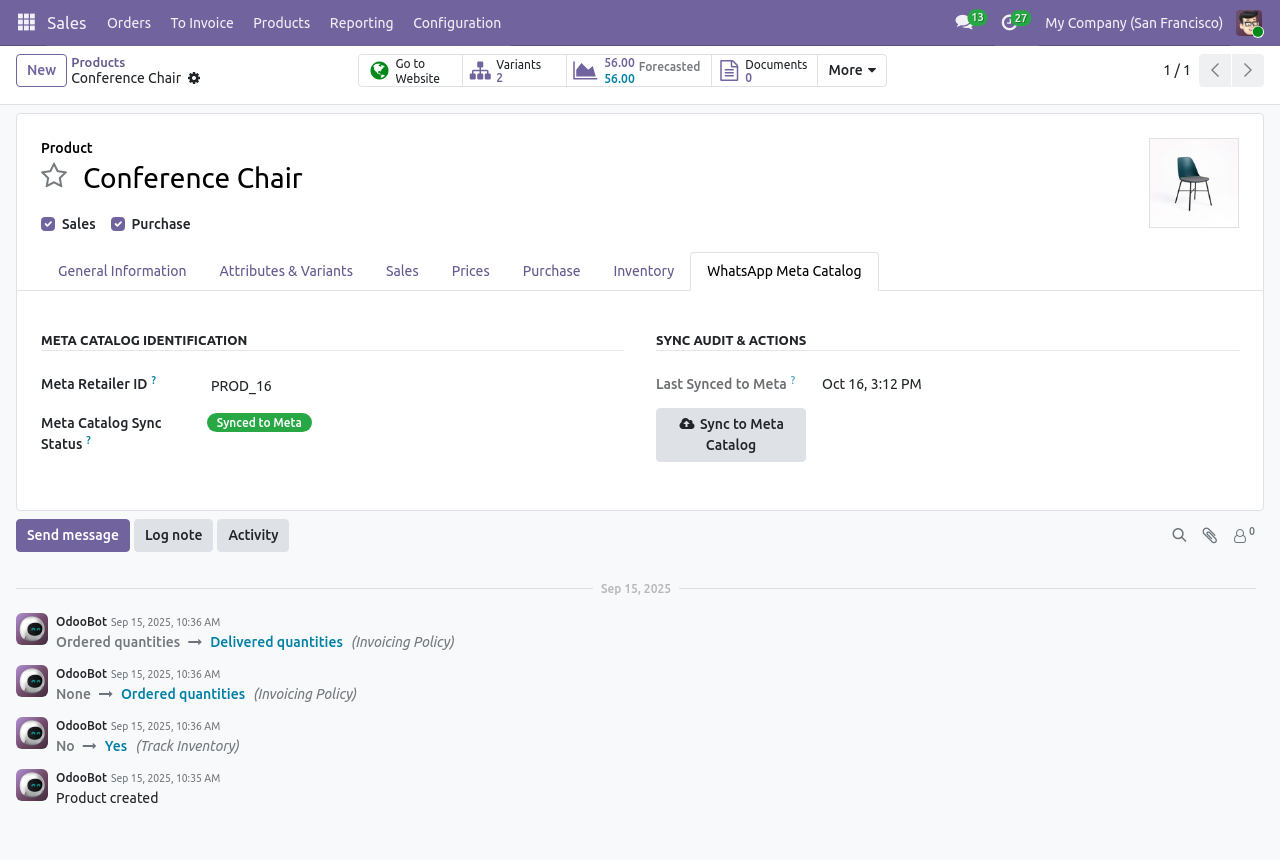
Odoo product form with WhatsApp catalog sync status
Catalog sync on the product form.
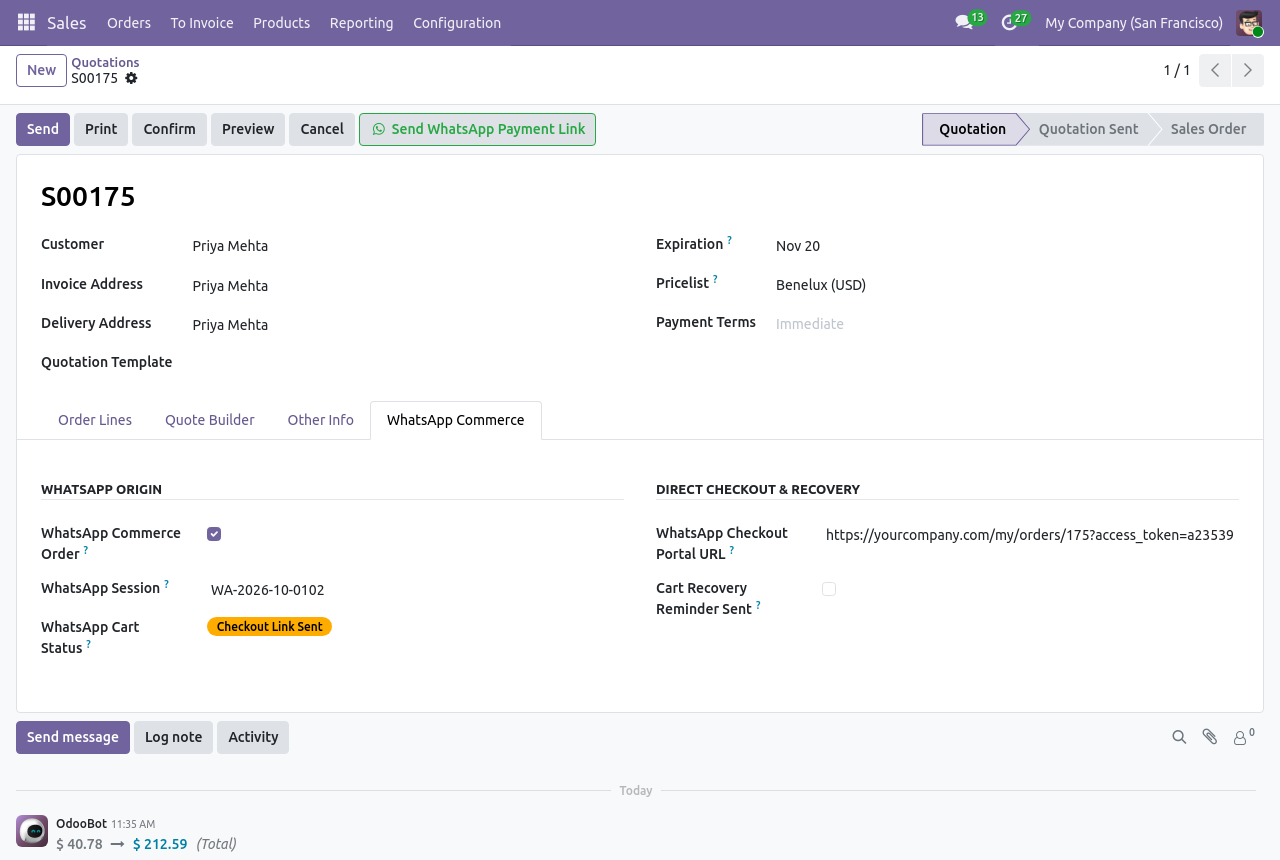
Odoo sales order with a Send WhatsApp Payment Link action
Send a payment link from any quotation.
Diagnose Catalog and Cart results in Odoo
Diagnose Catalog & Cart finds setup problems for you.

What it does

AI sales assistant, by text and voice

Works with Groq (Llama), Google Gemini or OpenAI. Voice notes are transcribed and answered like text. If a provider is overloaded, it retries once on a lighter model, and a cut-off answer is never sent.

Your catalog inside WhatsApp

Pushes products to Meta Commerce Manager, with optional real-time sync of price, image, stock and archiving, plus a scheduled sync every 12 hours for new and failed products.

Works with or without a Meta catalog

With a catalog: native multi-product messages. Without one: an in-chat product list with Add to Cart buttons.

One-tap checkout

Each tap builds an Odoo quotation, with Checkout, Add More and Clear Cart buttons. Checkout sends a secure Odoo payment link.

No cart left behind

Automatic reminders for unpaid carts after a delay you set, and an automatic Order Confirmed message after payment.

Everything recorded in Odoo

Full chat history with delivery status, and Meta errors logged where you can see them. Duplicate webhook deliveries are processed once.

Diagnose Catalog & Cart

One button checks for missing catalog links, cart visibility settings and token permissions, and tells you what to fix.

Payment links from the back office

Send WhatsApp Payment Link is available on any quotation, so your team can close sales started elsewhere.

Setup

  1. 1

    Connect WhatsApp

    In WhatsApp AI Commerce › Configuration › Settings, enter your Meta Phone Number ID, WhatsApp Business Account ID and a permanent System User token, then test the connection.

  2. 2

    Set the webhook

    Copy the webhook URL into the Meta App Dashboard with your verify token, and subscribe to the messages field.

  3. 3

    Choose an AI provider (optional)

    Pick Groq, Gemini or OpenAI, add the API key and test it.

  4. 4

    Turn on payments

    Enable an Odoo payment provider, optionally link a Meta catalog, and run Diagnose Catalog & Cart.

What you need

  • Odoo 19.0, Community or Enterprise, on Odoo.sh or your own server
  • A public HTTPS address, so Meta can reach the webhook
  • A WhatsApp Business number on the Meta Cloud API, with a permanent System User token
  • An Odoo payment provider, for checkout links
  • Recommended: an API key from Groq, Google Gemini or OpenAI
  • Optional: a Meta Commerce catalog (the token needs catalog_management) and Odoo eCommerce
  • Depends on Odoo Sales, Inventory, Invoicing and Discuss; installing also adds Payment and Portal

Good to know

  • Odoo Online is not supported: Odoo.sh or your own server only.
  • Uses free-form session messages, not WhatsApp templates, so messages reach a customer only within 24 hours of their last message. Keep reminder delays under 24 hours.
  • No live agent inbox: staff can send the catalog or payment links from Odoo, but can't type free replies there.
  • Product lists show up to 10 rows and the native catalog up to 30 products; each product is added as its default variant.
  • One WhatsApp number and one AI provider per database, shared across companies.
  • Handles text, voice notes, button taps and WhatsApp cart submissions. Images, documents and locations get a reply pointing to the catalog.
  • Meta and the AI provider bill their usage to you directly. The AI receives the message, recent chat and related Odoo context (products, cart, name, phone, recent orders and invoices).

Questions

Do I need an AI provider?

No, but it is recommended. Without one, customers shop with keywords (catalog, cart, checkout) and buttons. With one, they can ask questions in their own words or send voice notes.

Which payment methods work?

Any payment provider you have enabled in Odoo. The customer receives a secure Odoo payment link in WhatsApp.

Does it work on Odoo Online?

No. It needs Odoo.sh or your own server, because Meta must reach a webhook on your Odoo.

Is there a recurring fee?

No fee from us after the one-time purchase. Meta charges for WhatsApp conversations and your AI provider for usage, billed to you directly.

Can I try it first?

Yes. Book a free live demo below and we set up a private session you can test from your own phone.

Buy directly, book a demo or ask a question

Buying from us directly suits invoices in your company's name, several databases, or help with installation. We reply with a quote within one business day. Card checkout comes later.

We reply by email within one business day. See our privacy notice.