AI CPQ Product Configurator app icon

AI CPQ Product Configurator

Configure, price and quote made-to-order products in Odoo.

Customers design made-to-order products on your website with a live picture and ask a quote in one click. Server-side pricing and rules, a BOM per configuration, and AI setup from your price list.

  • Odoo 18.0
  • Odoo 19.0
  • Odoo 20.0
Availableon Odoo Apps

$149one-time

AI CPQ Product Configurator replaces variant explosion with one configurable product. You set up the steps, questions and options once, with prices, formulas and rules between the choices, and every configuration is checked and priced on the server.

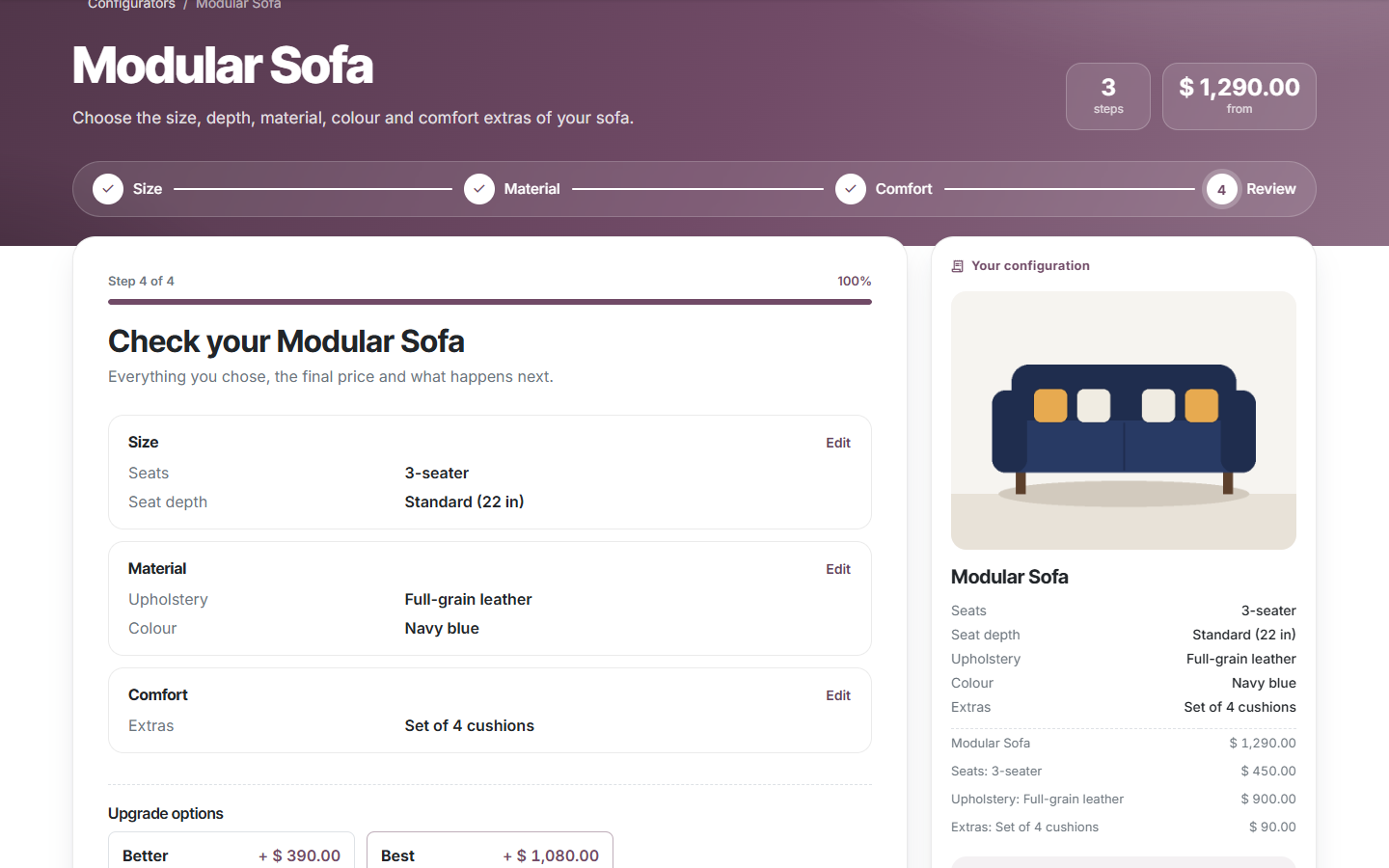
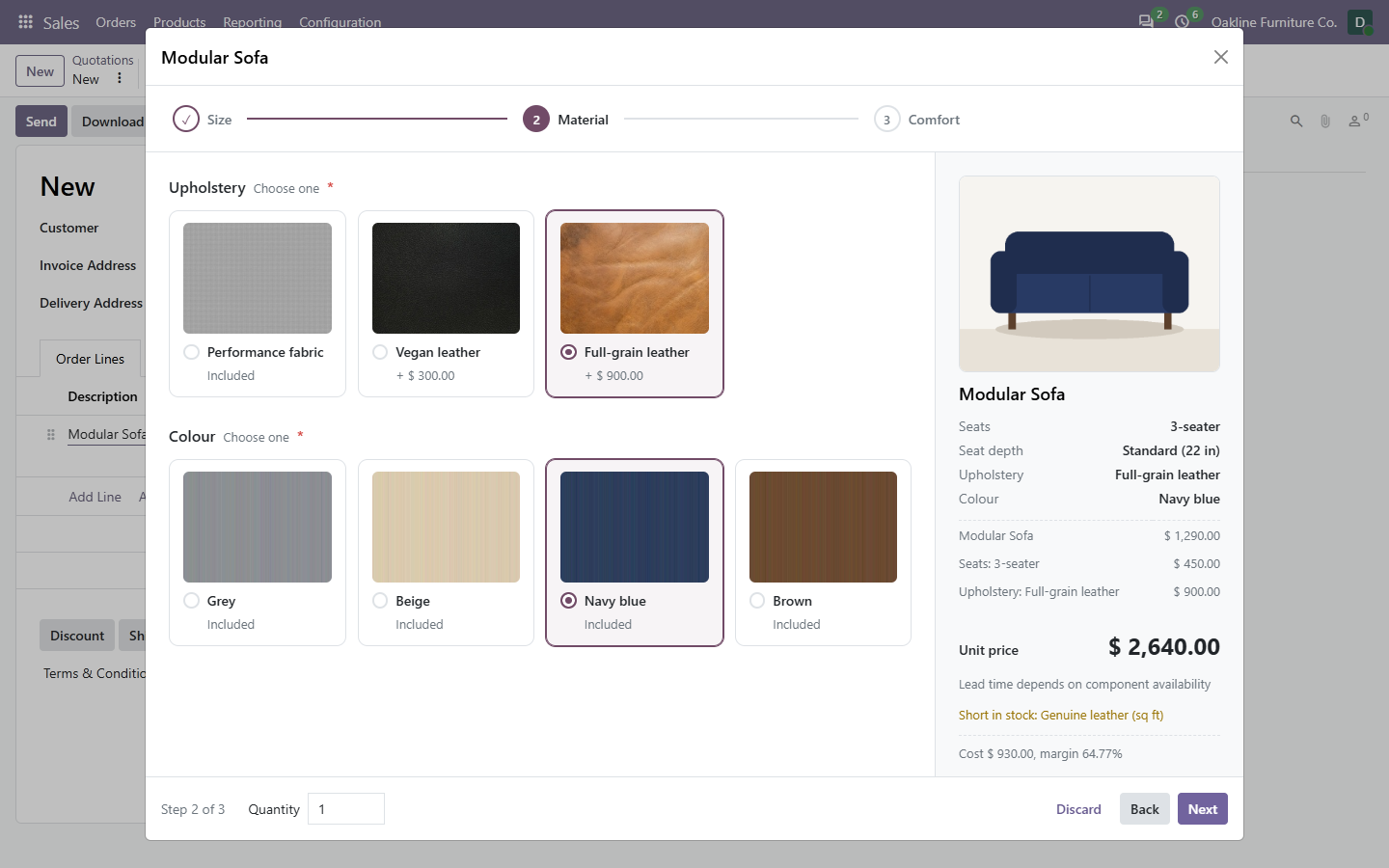
Customers design the product on the Design your own page of your website: step by step, with option photos, a live picture that changes with each choice and the running price. They request a quote in one click, even without an account, add it to the cart or save it for later in their portal. Salespeople use the same configurator on the quotation line, with cost and margin.

Each quote line keeps a frozen copy of what was sold, confirmed orders get their own bill of materials, and Good / Better / Best offers three versions in one click. AI drafts a whole template from your price list (PDF, photo, Excel or CSV), and a dashboard shows what sells.
Screenshots

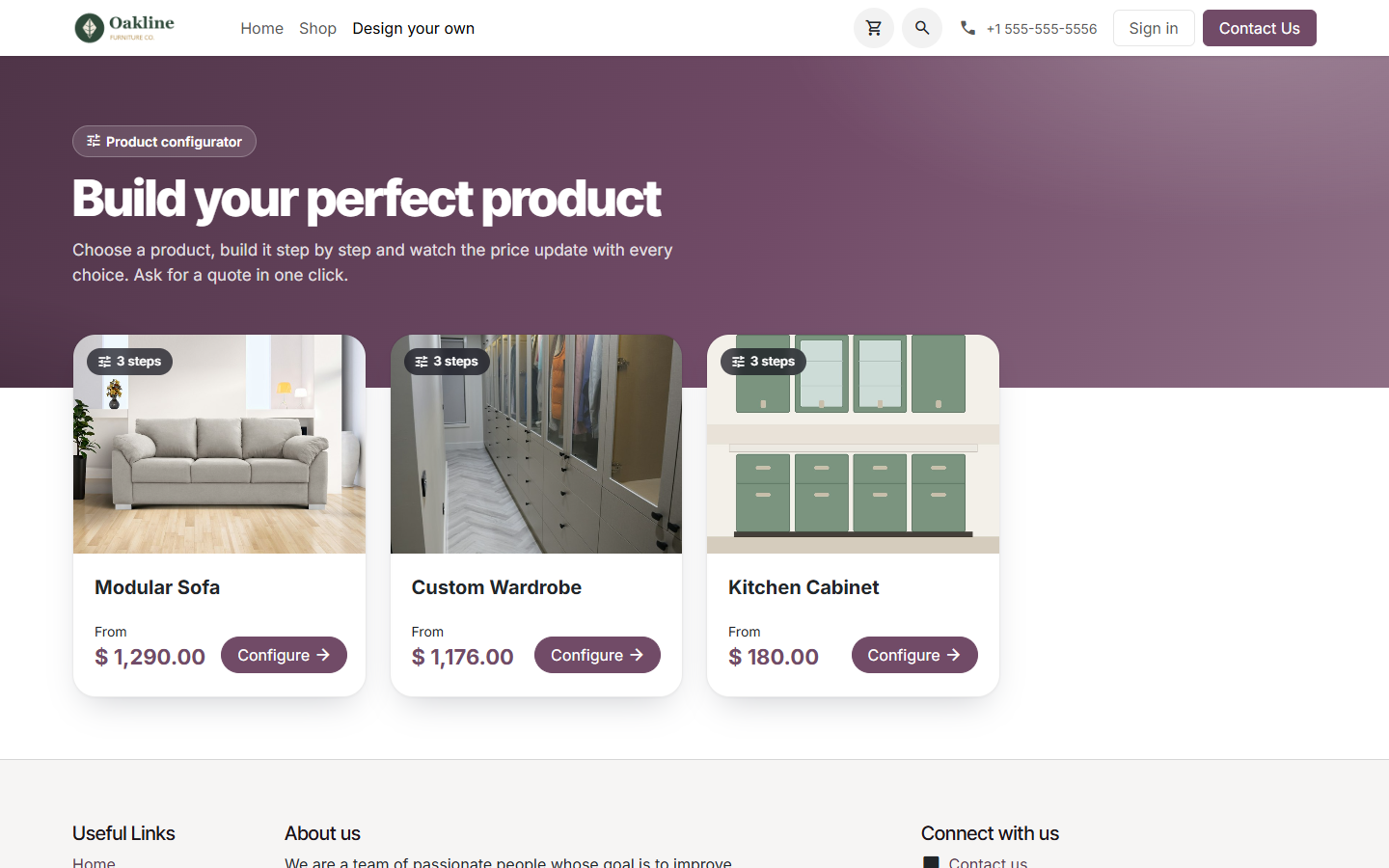
Design your own: every configurable product with its From price
The website configurator: steps, live picture and the review step
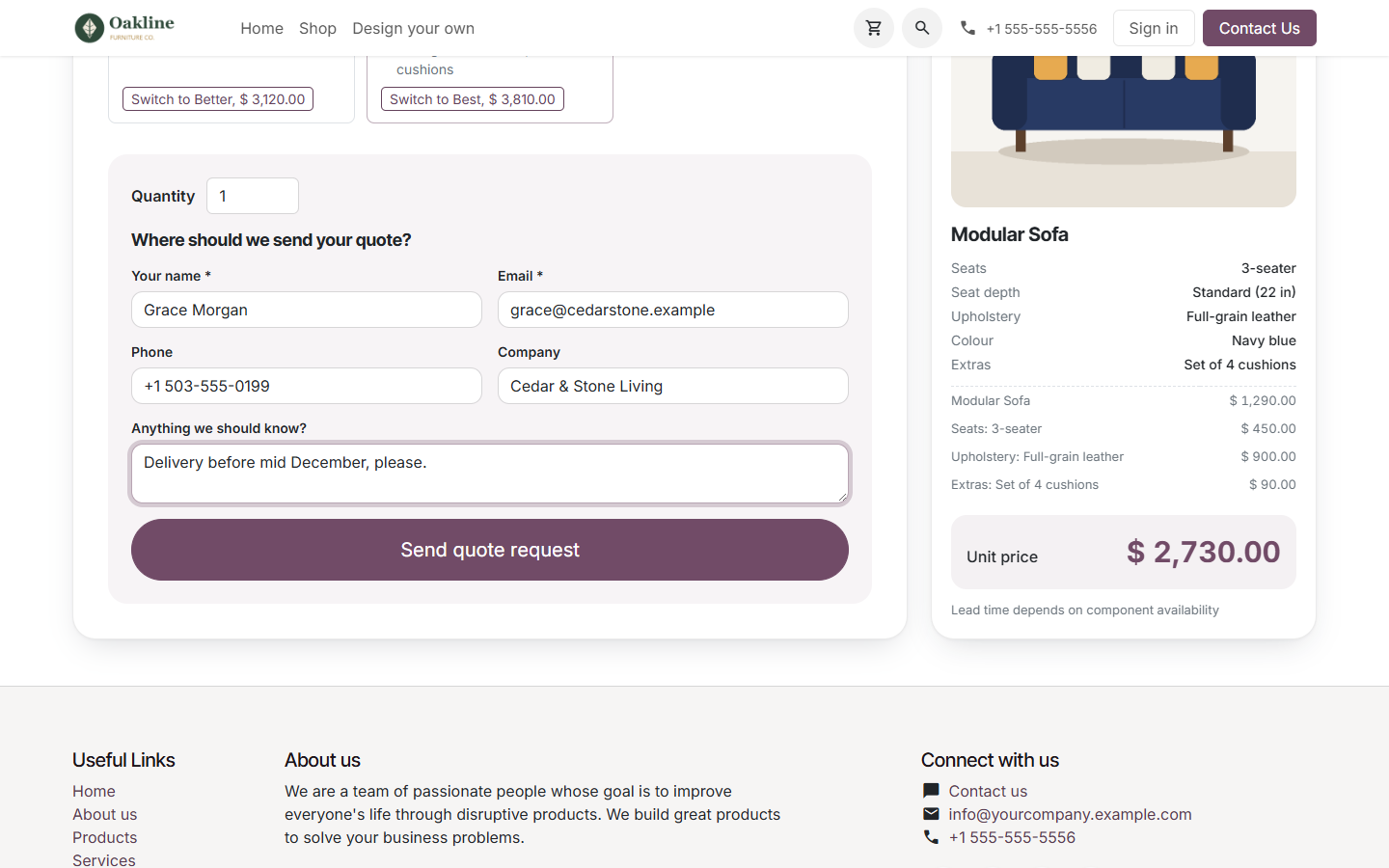
A quote request without an account
The same configurator on a quotation line, with cost and margin
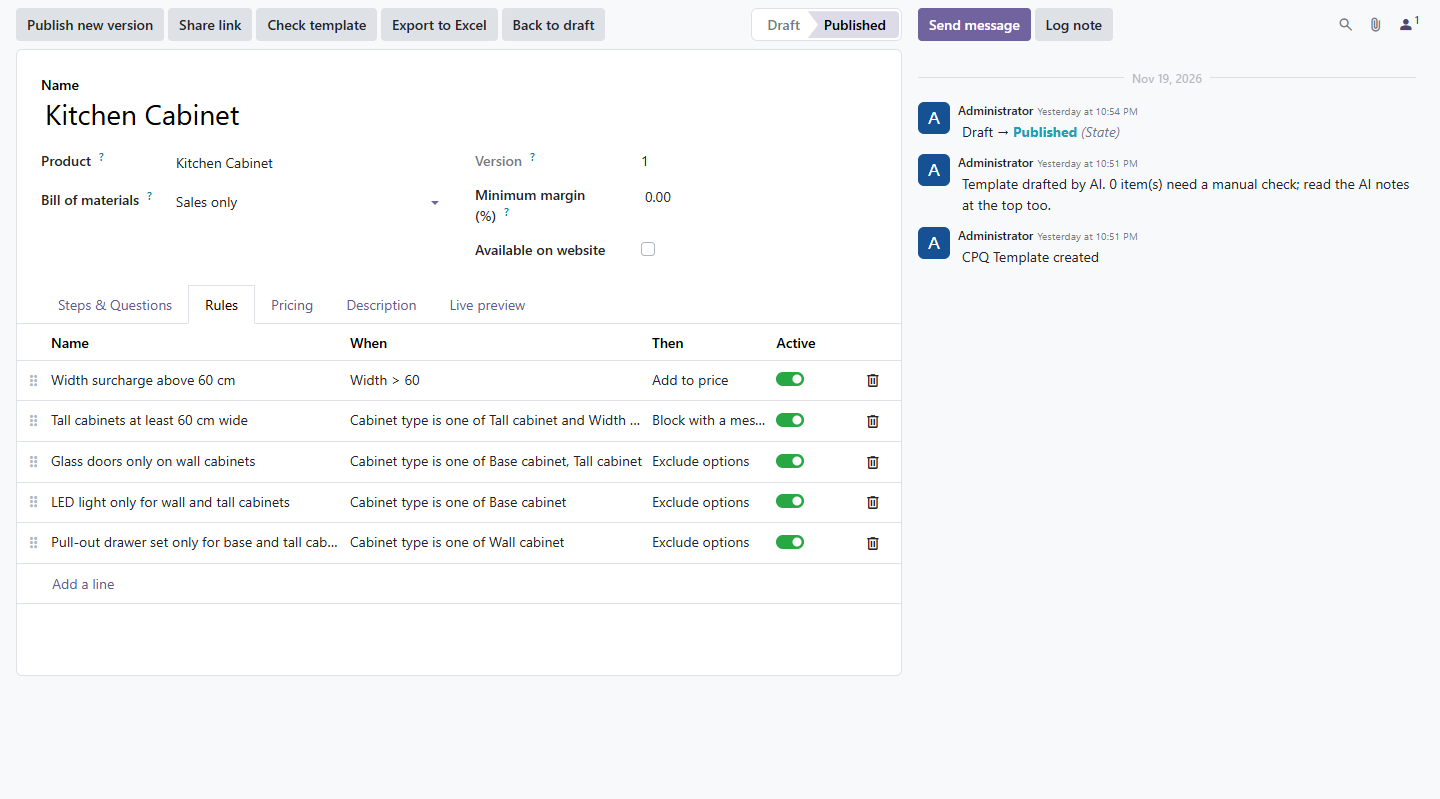
Rules drafted by AI from a kitchen price list
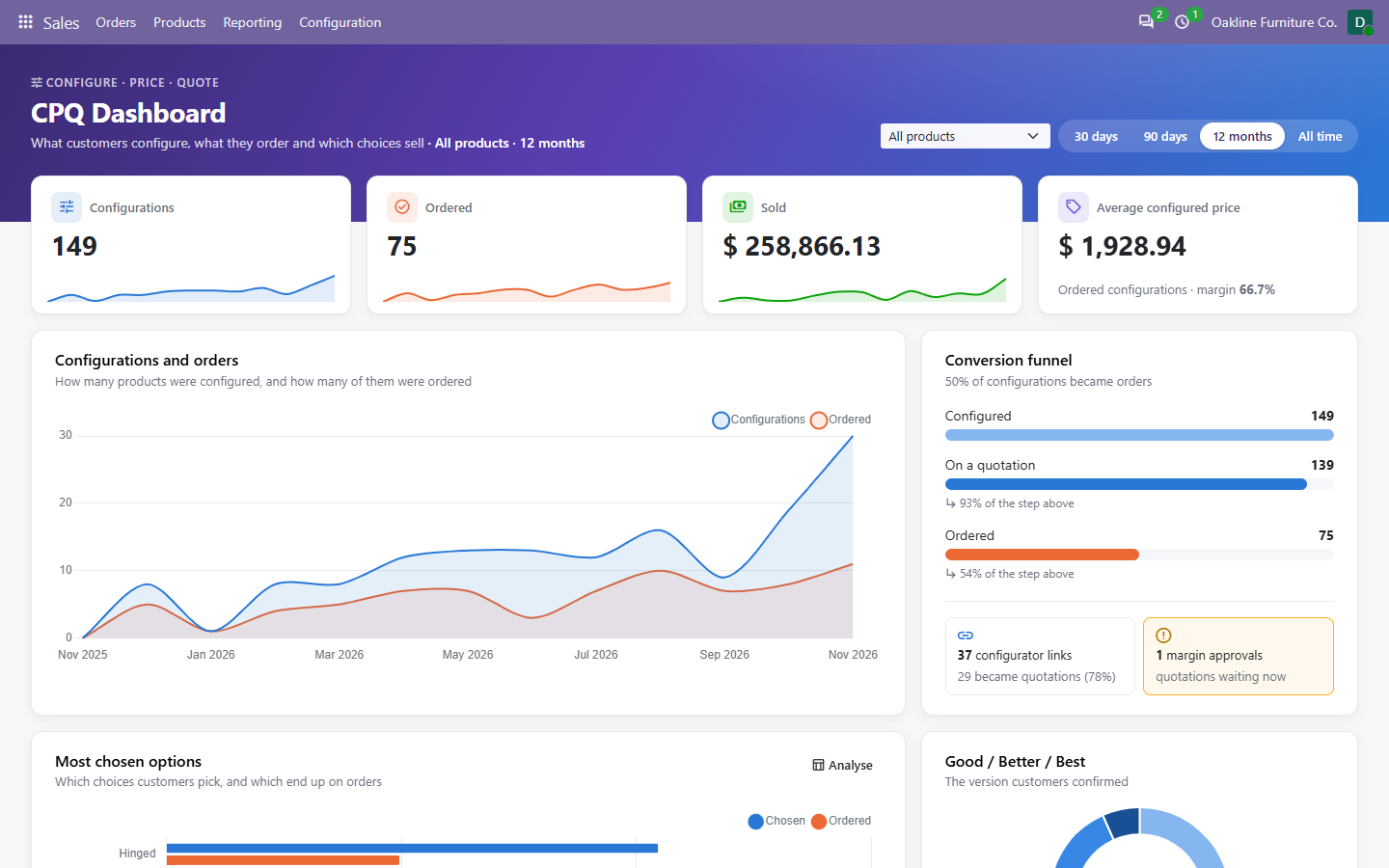
CPQ dashboard: trend, funnel and most chosen options

What it does

AI setup from your price list

Upload a PDF, photo, Excel or CSV price list and AI drafts the template: steps, questions, options, extra prices, formulas and rules with several conditions. You check the draft and its notes, then publish.

Live picture preview

A background picture plus a transparent layer per option: the sofa changes colour and the cushions appear as the customer chooses.

Design your own website page

Configurable products get their own page in your website menu with their From price. Each opens a full page in your theme colours with a stepper, option cards, the live picture, the running price and a review step. Works on phones.

Quote without an account

Logged-in customers request a quote in one click; visitors fill a short form. A quotation and a To-Do for the salesperson are created. Customers find saved configurations under Your Configurations in their portal.

Prices and rules you can trust

Base price or formula (width * height * 28), option extras, price rules and pricelists on top. Every answer is checked and every price calculated on the server; customers never see cost or formulas.

Good / Better / Best

One click adds three versions to the quotation and the customer picks one online. On the website, the review step offers the Better and Best upgrades.

A bill of materials per configuration

Confirmed orders get a BOM with exactly the chosen components, reused when they are the same, for manufacturing orders or kit deliveries. Each quote line keeps a frozen copy of what was sold.

Margin control and dashboard

Below the template's minimum margin, quotations wait for a Sales Administrator. A daily check warns when component costs rise, and the CPQ dashboard shows sales, conversion and the most chosen options.

Setup

  1. 1

    Install

    Install the module with its free dependencies Kalvyai AI Base and Kalvyai WhatsApp Base.

  2. 2

    Turn on what you need

    In Sales › Configuration › Settings › CPQ Product Configurator, turn on Use AI in CPQ if you want AI, and click Load furniture pack to try the samples.

  3. 3

    Create a template

    In Sales › Products › CPQ Templates, build a template by hand, with AI or from Excel, click Check template, then Publish.

  4. 4

    Set up manufacturing

    For manufactured products, click Set up manufacturing: it adds the Replenish on Order route and a base bill of materials.

  5. 5

    Sell it online

    Tick Available on website and choose the website buttons (add to cart, request a quote or both). The product appears on Design your own, or send it with Share link on WhatsApp.

What you need

  • Odoo 18.0, 19.0 or 20.0, Community or Enterprise, on Odoo.sh or your own server
  • Sales, Manufacturing, eCommerce and Portal (installed with the module)
  • The free Kalvyai AI Base and Kalvyai WhatsApp Base (installed with the module)
  • Python packages openpyxl and xlsxwriter, for Excel import and export
  • Optional: your own API key from an AI provider, for AI setup
  • Optional: a WhatsApp Business (Cloud API) account, for automatic sending

Good to know

  • The live preview is 2D: it stacks pictures you prepare for each option. There is no 3D model viewer.
  • Excel import and export cover questions and options; rules are set up in Odoo.
  • AI setup needs your own AI provider key; the module works fully without AI.
  • Automatic WhatsApp sending needs a WhatsApp Business (Cloud API) account; Open in WhatsApp works without setup.
  • Configurable products are sold from Design your own and leave the normal shop list.
  • One template per product: configurations replace variants for that product.
  • Odoo Online (SaaS) is not supported: Odoo.sh or your own server only.

Questions

Can I use the module without AI?

Yes. Leave Use AI in CPQ off and build templates by hand, from Excel or from the furniture pack.

Which AI providers work, and who pays for them?

The providers of the free Kalvyai AI Base: Anthropic Claude, OpenAI, Google Gemini, xAI Grok, Mistral AI, NVIDIA NIM and more. You use your own API key and pay the provider directly.

Can customers ask a quote without an account?

Yes. Visitors leave their name, email and, if they want, phone, company and a note. A new contact and a quotation are created, and the salesperson gets a To-Do. Logged-in customers ask in one click.

Do I have to use manufacturing?

No. Each template is Sales only, Manufacture or Kit. Sales only creates no bill of materials.

What happens to old quotes when I change a template?

Nothing. Each line keeps a frozen copy of its choices and price. Publishing creates a new template version for new configurations.

Is it a subscription?

No. One-time purchase, with 90 days of support and free updates for your Odoo version.

Buy directly, book a demo or ask a question

Buying from us directly suits invoices in your company's name, several databases, or help with installation. We reply with a quote within one business day.

We reply by email within one business day. See our privacy notice.

More apps