

Skip to content
KalvyAI

AI Base

Plug any AI model into Odoo, with a hard monthly cap.

Connect Odoo to OpenAI, Claude, Gemini, Grok, Azure OpenAI and four more providers from one screen. Set a monthly token cap per provider and see every call in a usage log.

  • Odoo 19.0
  • Odoo 20.0
Availableon Odoo Apps

FreeLaunch offer

AI Base is the connection layer between Odoo and the AI providers you choose. Add a provider, paste your own API key, and any Odoo app or custom module can call that model through one method, with the same logging and limits everywhere.

The point is control. Each provider has a hard monthly token cap that is checked before a call is sent, so a runaway script or a busy month can't produce a surprise bill. Every call is recorded with the user, model, feature, linked record, tokens, duration and result, so you can see exactly where AI is used and what it costs.

Keys stay with managers: AI users can use the providers but never see the keys. It works in multi-company databases, with separate providers, keys, caps and usage per company. You pay the AI providers directly at their prices; AI Base adds no subscription and no commission on usage.

Screenshots

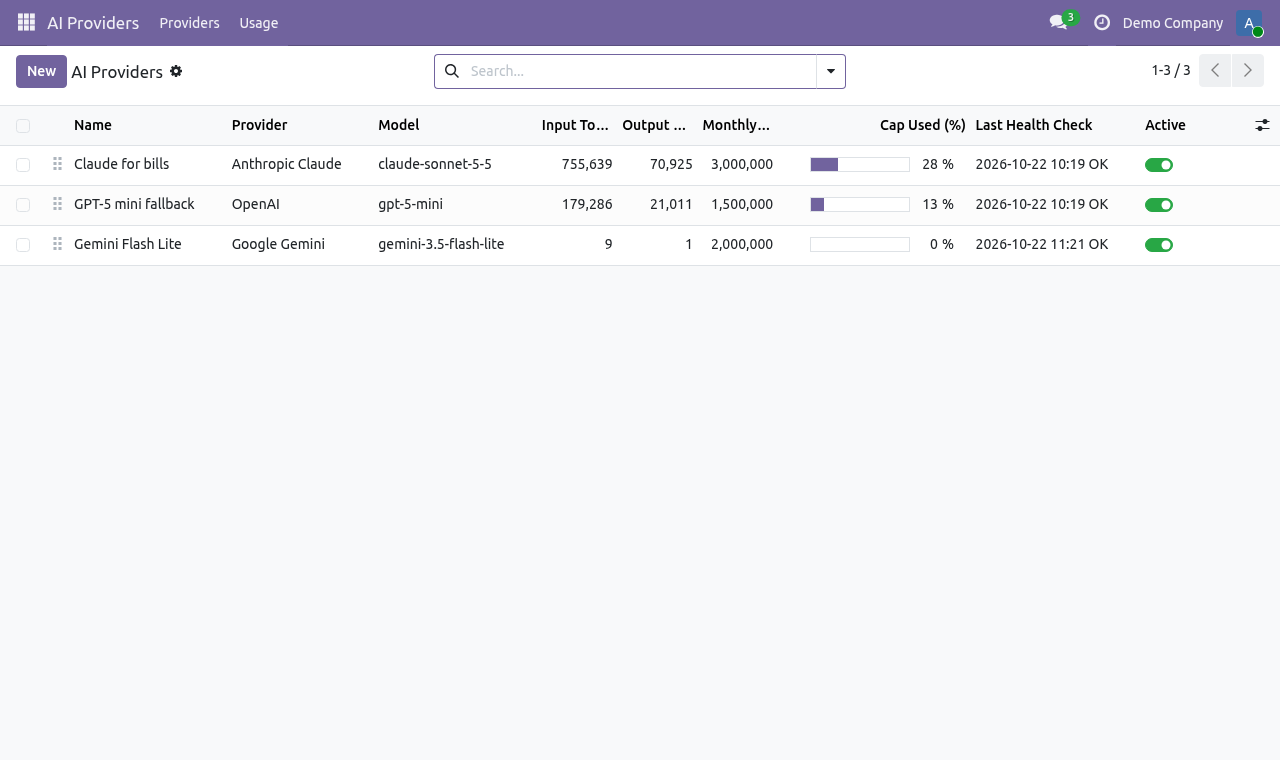
AI providers list in Odoo: each provider with its model, monthly token cap and usage
Providers, one per AI service, each with its own cap.
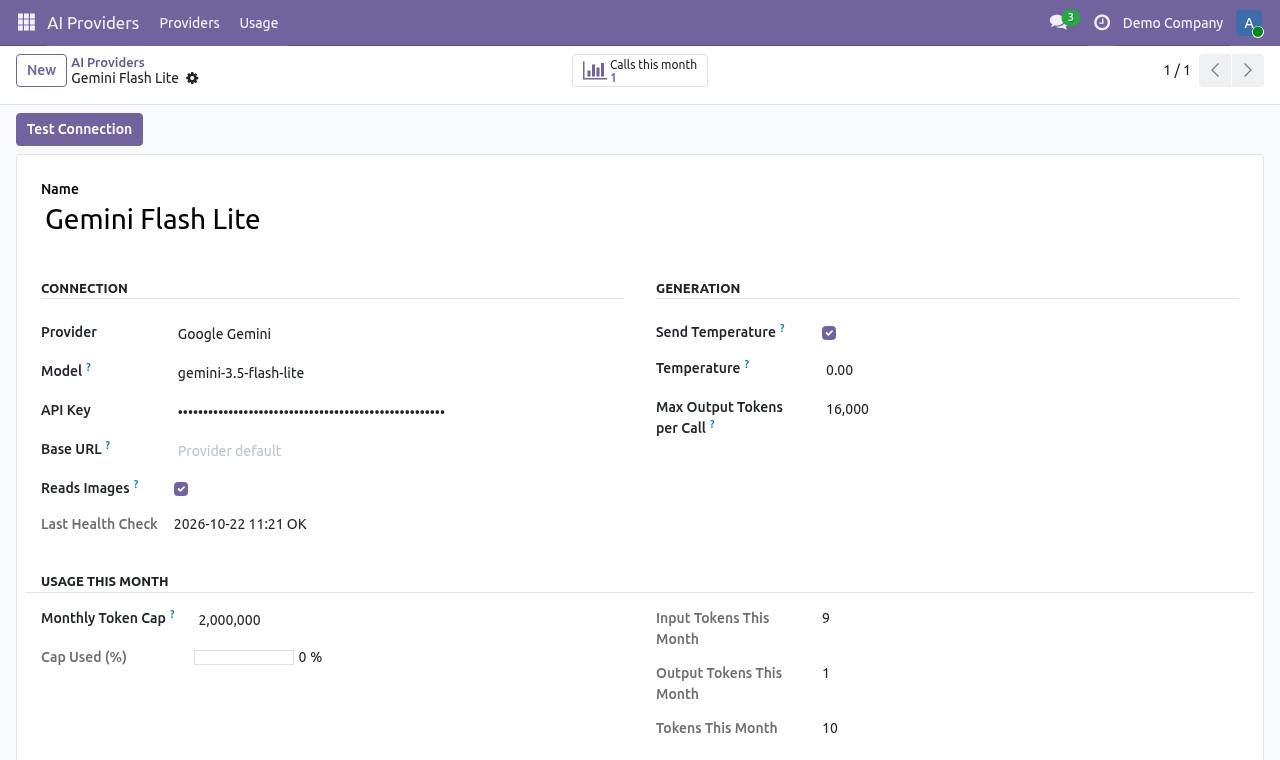
AI provider form in Odoo with API key, default model, base URL and monthly token cap
The provider form: key, model, optional base URL and the monthly cap.
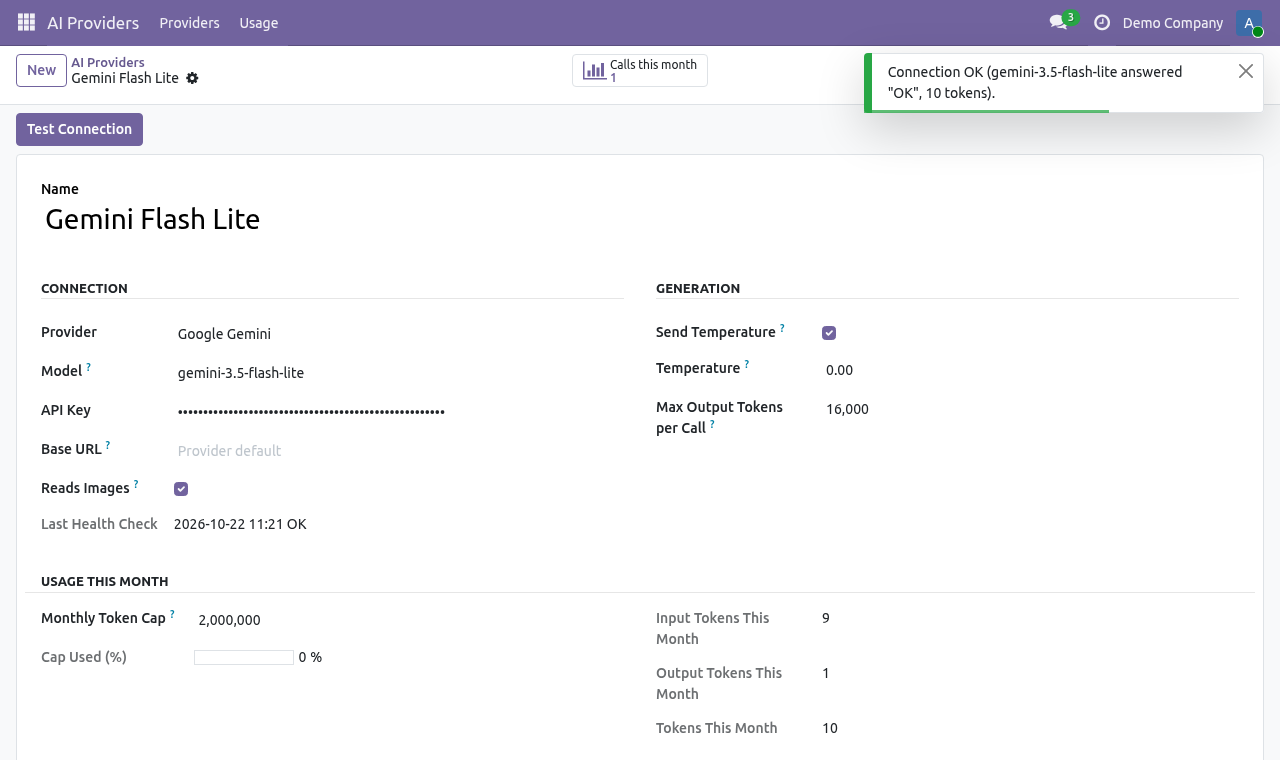
Test Connection result confirming the API key and model work
Test Connection checks the key and model with a tiny prompt.
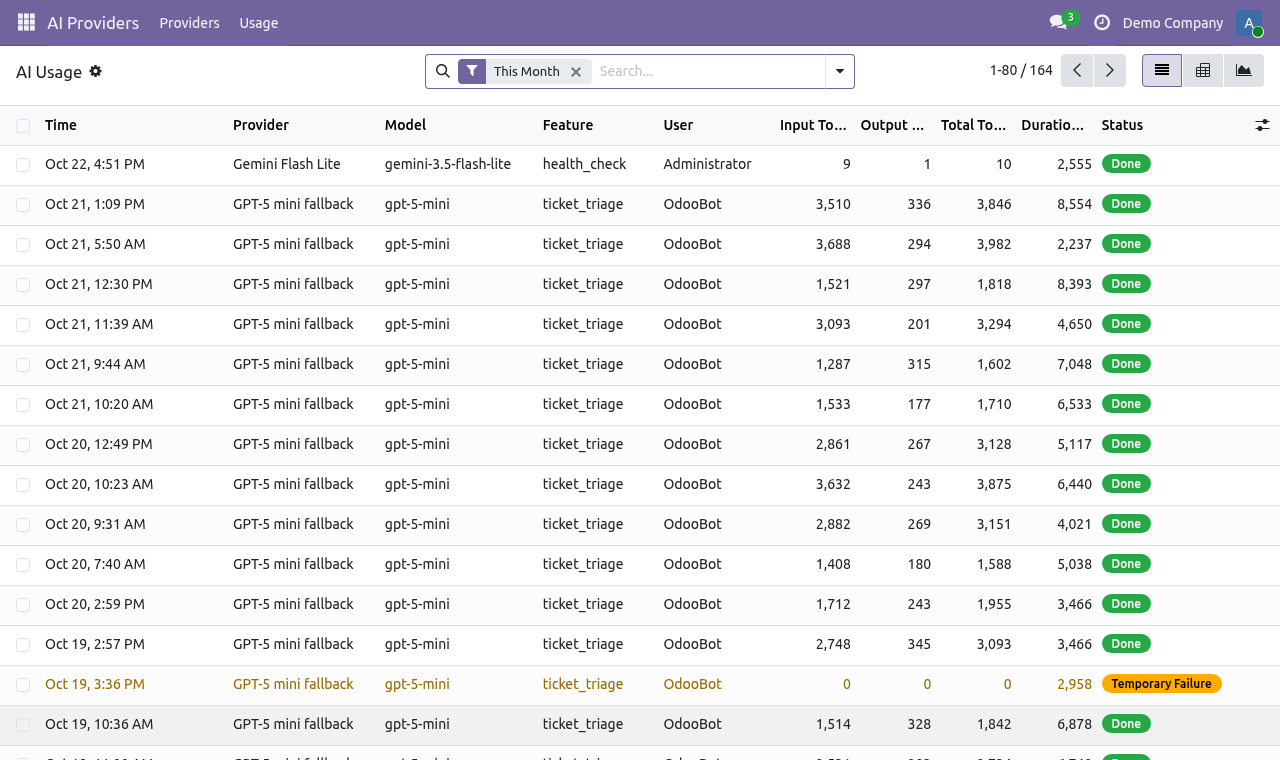
AI usage log listing every call with provider, model, user, tokens, duration and status
Every call is logged: who, which model, how many tokens, how long.
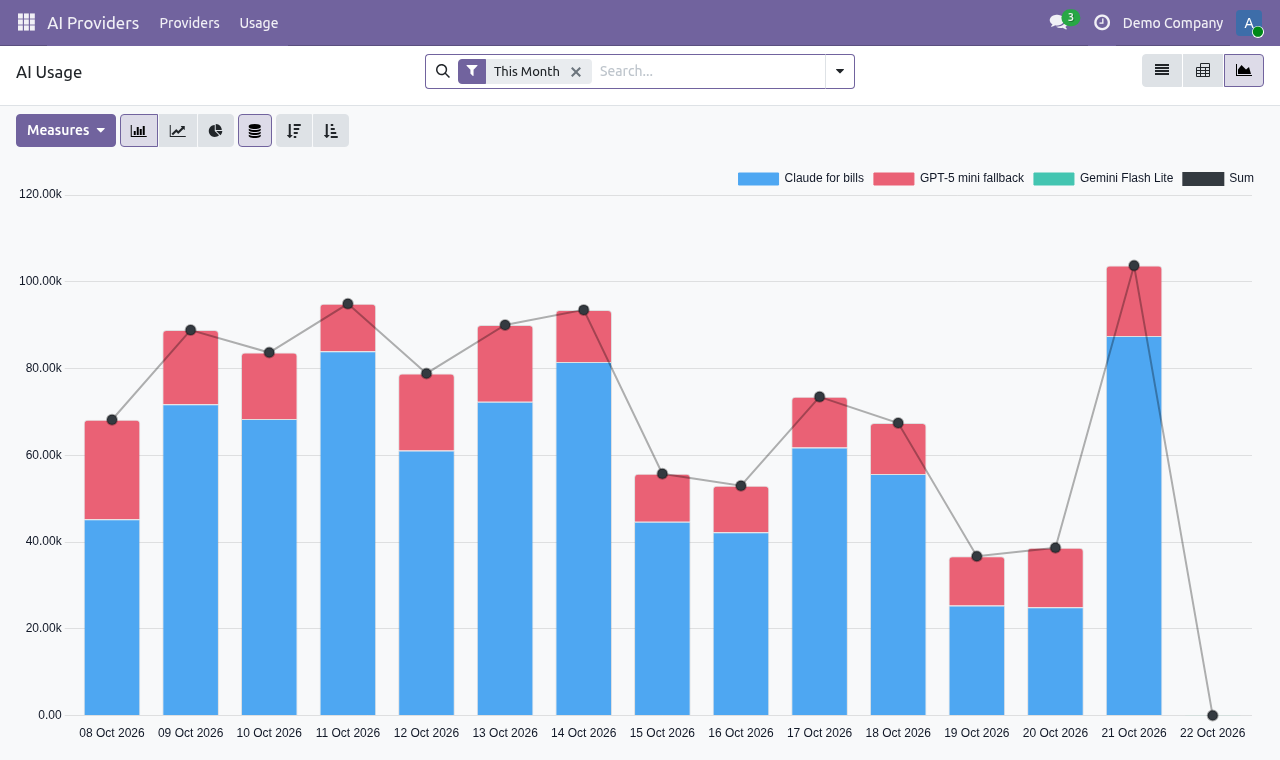
Graph of AI token usage over time by provider
Usage over time, per provider.
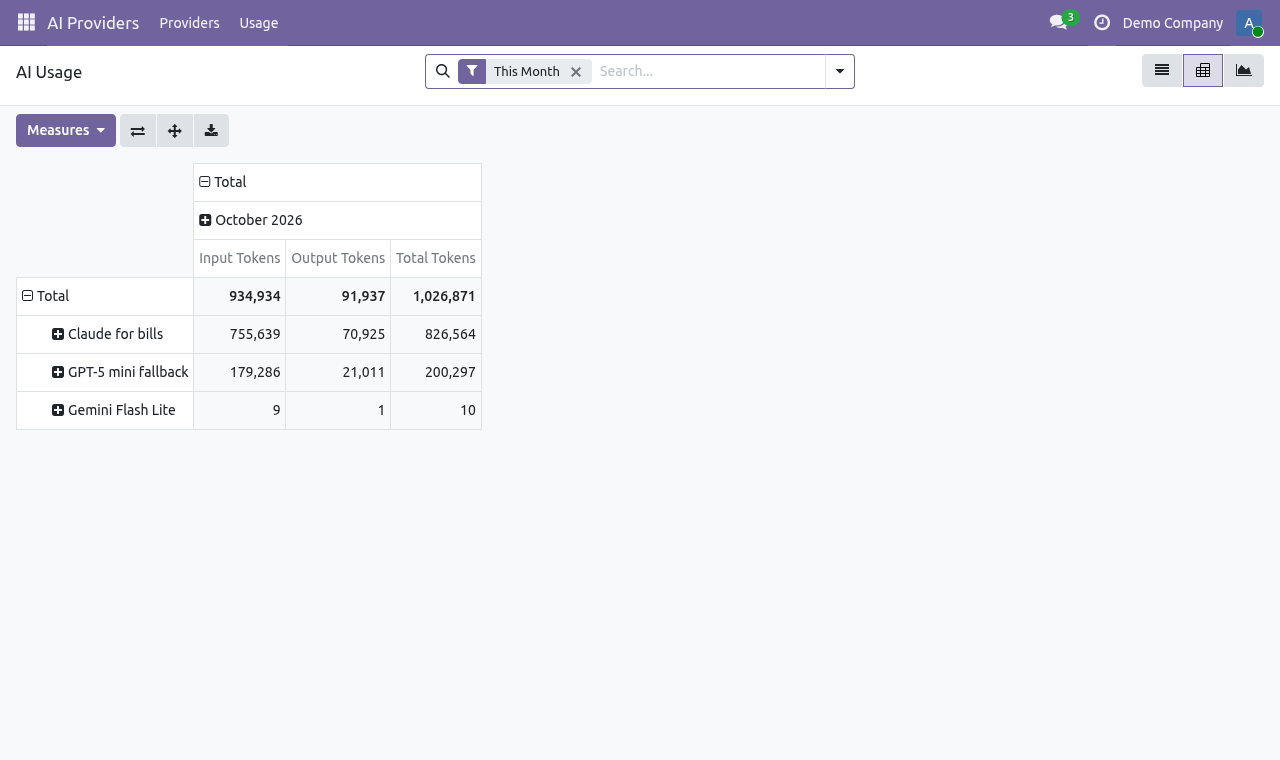
Pivot table of AI token usage by user and provider
Pivot view: tokens by user, feature or provider.

What it does

Nine providers, one form

OpenAI, Anthropic Claude, Google Gemini, xAI Grok, Azure OpenAI, Mistral, Cohere, Perplexity and NVIDIA NIM. Pick a provider, paste your key, and a sensible default model is filled in. Any model the provider offers can be entered.

Hard monthly token cap

Limit input and output tokens per provider per month. The cap is checked before a call is sent, not after the bill arrives. Zero means unlimited.

Every call logged

Provider, model, user, feature, linked record, tokens, duration and status, with list, graph and pivot views for reporting.

One-click Test Connection

Sends a tiny prompt to confirm the key and model work before anyone relies on them.

Keys stay with managers

Two access groups: AI users can call providers; only AI managers can add providers and enter or see keys.

Reads PDFs and photos

Send PDFs and images (JPEG, PNG, WebP, TIFF). Photos are rotated upright and resized to 2,400 px before sending, which keeps token use down.

Structured JSON answers

Pass a JSON schema and get back a Python dict, ready to write into Odoo fields without parsing free text.

Gateways and self-hosted models

Override the base URL to route through a proxy or gateway, or to use self-hosted models on Ollama, vLLM or NVIDIA NIM.

Setup

  1. 1

    Install AI Base

    Install ki_ai_base from Apps. An AI Providers menu appears.

  2. 2

    Add a provider

    Go to AI Providers › Providers › New, choose the provider and paste your API key.

  3. 3

    Set a cap and test

    Enter a monthly token cap and click Test Connection.

  4. 4

    Give people access

    In Settings › Users, give staff the role AI Providers: User or AI Providers: Manager.

What you need

  • Odoo 19.0 or 20.0, Community or Enterprise
  • Odoo.sh or your own server (on-premise)
  • Your own API key from at least one AI provider. The provider bills you directly.
  • Depends only on Odoo's base and Discuss (mail) apps; the Python libraries it uses ship with Odoo.

Good to know

  • AI Base is the connector, not an assistant: it gives your Odoo apps and custom modules a safe way to call AI. Features that use it are built on top.
  • Image input, native PDF reading and JSON schemas depend on the model you choose. Native PDF reading works with OpenAI, Claude and Gemini.
  • Calls time out after 70 seconds by default (developers can change this per call).

Questions

Do you charge for AI usage?

No. You use your own API keys and pay the AI providers directly at their prices. There is no subscription and no commission.

What happens when the monthly cap is reached?

Calls to that provider stop until the next month or until a manager raises the cap. The cap is checked before each call is sent, so you are never billed past it.

Can developers use it in their own modules?

Yes. Call _generate() on a provider record. It raises BudgetExceeded when the cap is reached, ProviderBusy for temporary failures you can retry, and UserError for permanent ones. Usage is logged automatically.

Can I use a self-hosted model?

Yes. Set the base URL to your Ollama, vLLM or NVIDIA NIM endpoint, or to a gateway or proxy.

Does it work with several companies?

Yes. Providers, keys, caps and usage are kept per company, with record rules.

Buy directly, book a demo or ask a question

Buying from us directly suits invoices in your company's name, several databases, or help with installation. We reply with a quote within one business day. Card checkout comes later.

We reply by email within one business day. See our privacy notice.